Last updated: October 12, 2026
- Best Vinyl Cutting Machines for Small Business: Top Picks and Comparison
- Top 3 Picks
- Quick Comparison
- How We Chose
- 1. VEVOR Vinyl Cutting Machine, 12 in – Best for Beginners and Built-In Design Libraries
- 2. VEVOR Vinyl Cutter Machine 34 Inches Bundle – Best for High-Volume Signage and Decal Production
- 3. VEVOR Vinyl Cutter 28 Inch – Best for Mid-Size Production Without a Giant Footprint
- 4. Brother SDX125EGY ScanNCut – Best for Cutting Around Printed Designs
- 5. Cricut Joy Xtra – Best for Low-Cost Sticker and Label Businesses
- 6. Cricut Maker 4 (Seashell) – Best for Mixed-Material Small Businesses
- How to Choose
- Frequently Asked Questions
- Final Recommendation
Best Vinyl Cutting Machines for Small Business: Top Picks and Comparison
The best vinyl cutting machine for most small businesses is the Cricut Maker 4, because its wide material range, strong software ecosystem and 13-inch cutting width let one machine handle everything from adhesive vinyl decals to thicker specialty media without a second purchase. If your work is mostly long runs of standard vinyl, such as shop signage, vehicle lettering or bulk decals, the VEVOR Vinyl Cutter Machine 34 inches is the better value: a wide-format plotter that cuts full roles quickly and cheaply. For a lean one-person operation selling stickers and small decals, the Cricut Joy Xtra is the lowest-risk entry point, and the Brother SDX125EGY suits anyone who needs to cut around printed designs without a computer attached. The right pick depends on three things above all: how wide your largest design is, which materials you cut most often, and how many units you produce in a typical week.
Top 3 Picks
See also: MaxxFan Deluxe vs Fantastic Fan for Vans: Which to Choose? • Can I Lay LVP in a Van? Van Flooring Guide
Best Overall: Cricut Maker 4
The Maker 4 is the most versatile machine here, cutting adhesive vinyl, iron-on, cardstock, bonded fabric and thicker materials with swappable blades and tools. It suits a small business that sells a mix of products rather than one narrow line. Its 13-inch cutting width covers most decal, apparel and packaging work, and the design software handles both simple cut files and more advanced multi-layer projects.
Best Budget: Cricut Joy Xtra
The Joy Xtra is the cheapest sensible starting point for a sticker, label or small-decal business. It cuts up to 8.5 inches wide and handles the everyday materials a beginner actually uses: adhesive vinyl, iron-on and cardstock. It is quiet, compact and quick to learn, which matters when you are testing whether a product line sells before investing in a larger machine.
Best Premium: Brother SDX125EGY ScanNCut
The ScanNCut is the premium choice for anyone who prints designs on a home or office printer and then needs to cut precisely around them. A built-in scanner reads registration marks, so no computer is required during cutting, and the machine is well suited to paper crafts, card making and printed sticker sheets where accuracy around artwork is the whole product.
Quick Comparison
| Product | Best For | Key Specs | Price Tier |
|---|---|---|---|
| VEVOR Vinyl Cutting Machine, 12 in | Beginners who want built-in designs and a compact desktop footprint | 12-inch cutting width, button and screen control, 20,000+ built-in design resource, desktop size | Budget |
| VEVOR Vinyl Cutter Machine 34 inches Bundle | Sign shops and bulk decal production on long vinyl rolls | 34-inch feed width, manual vinyl plotter, bundled accessories, roll-fed operation | Mid-range |
| VEVOR Vinyl Cutter 28 Inch | Mid-size production where 34 inches is more width than you need | 28-inch cutter, 20 blades included, maximum paper feed 720 mm | Mid-range |
| Brother SDX125EGY ScanNCut | Printed designs that need precise cut-around accuracy, no computer needed | Built-in scanner with registration mark reading, standalone operation, grey finish | Premium |
| Cricut Joy Xtra | Stickers, labels and small decals on a tight budget and small desk | Compact smart cutting machine, cuts up to 8.5 inches wide, digital content bundle included | Budget |
| Cricut Maker 4 (Seashell) | Mixed-product businesses cutting vinyl, iron-on, cardstock and thicker materials | 13-inch cutting width, adaptive tool system, digital content bundle included, seashell colour | Premium |
How We Chose
This roundup is built from manufacturer specifications, published material compatibility lists and category-level knowledge of how vinyl cutters behave in small production settings, not from physical testing of each unit. The first filter was cutting width, because it directly limits the largest single-piece design you can sell: a 12-inch class machine caps most projects at roughly 11.5 inches of usable width, while a 34-inch plotter handles full signage panels and long roll runs. The second filter was material compatibility, since a craft-class machine and a roll-fed plotter are not interchangeable for every substrate. The third was software and learning curve: some machines work standalone from a screen, others depend on a design app, and that choice shapes how quickly a new operator becomes productive. The fourth was production speed and workflow fit, including whether a machine is fed sheet by sheet or from a continuous roll. Finally we looked at upgrade path and total ownership cost, weighing included accessories, blade replacement, cutting mats and any subscription-style content services against the price tier. Every product listed is a real, currently available model from an established brand, and each is placed where it genuinely fits a small business use case rather than where it happens to sit in the market.
1. VEVOR Vinyl Cutting Machine, 12 in – Best for Beginners and Built-In Design Libraries

VEVOR Vinyl Cutting Machine, 12 in, Button and Screen Controlled Vinyl Cutter, 20000+ Built-in Design Resources, Compatible with Mac, Windows, Android and iOS, for Creating Customized Crafts Cards
Included for 'Best Vinyl Cutting Machines for Small Business' because the listing specifies 12 in and Button and Screen Controlled Vinyl Cutter, details this guide uses to compare options.
View on AmazonThis is the machine to buy when you want to start cutting vinyl this week with the least setup friction and the smallest outlay. It is a desktop-class cutter with a 12-inch working width, controlled by physical buttons and an on-screen interface rather than a phone or laptop, and it ships with a large built-in design resource of more than 20,000 designs. For a small business testing a decal, sticker or small-signage line, that combination removes two common barriers at once: you do not need to learn design software on day one, and you do not need a dedicated computer at the machine.
Key specs at a glance
- Cutting width class: 12 inches (roughly 11 to 11.5 inches usable for most designs, depending on the file)
- Control: physical buttons plus an on-screen menu
- Design library: 20,000+ built-in designs available on the machine
- Media handling: sheet and roll feeding within the 12-inch class
- Footprint: desktop size, suitable for a home office or small workbench
- Typical materials: adhesive vinyl, heat-transfer vinyl, paper and cardstock within the machine’s pressure range
Strengths
The strongest argument for this machine is speed to first sale. Because the design library is on board, an operator can pick a shape, set the material, load the vinyl and cut without ever opening a design program. Button-and-screen control also means the machine can be run by someone who is not confident with computers, which is a real advantage in a family business or a market stall setup where you want a second person to be able to produce stock. The 12-inch width covers the overwhelming majority of small-business decal work: laptop stickers, cup decals, small shop signs, car window graphics and most personalised gift items all fit comfortably. Consumable costs are low relative to larger machines because a single roll of standard vinyl goes a long way at this width, and the machine’s modest size means it can live on a desk rather than needing its own table.
A practical detail worth planning around is blade and mat wear. On any cutter in this class, the blade dulls first when you cut abrasive or glitter materials, and the cutting mat loses tack with repeated use, especially if you cut paper and cardstock on the same mat you use for vinyl. Budget for replacement blades and at least one spare mat as an ongoing cost, and keep a separate mat for paper if you cut both, because paper fibres and dust degrade the tack that vinyl needs to stay put during a cut.
Pros
- Very low entry cost for the width class
- Works standalone with a large built-in design library, so no design software is required to start
- Button and screen control is easy to teach to a second operator
- 12-inch width covers most small decal, sticker and signage jobs
- Compact desktop footprint suits a home workshop
Cons
- Caps your maximum design width at the 12-inch class, so large signage is out of reach
- Not designed for continuous high-volume roll production the way a wide plotter is
- Fewer of the swappable specialty tools found on tool-system machines
- Screen-based workflow offers less fine control over cut files than a full design application
How it compares
Against the Cricut Joy Xtra, this machine wins on width, since the Joy Xtra cuts up to 8.5 inches wide, and it wins on standalone operation because the design library lives on the machine. The Joy Xtra counters with a more polished design app, a lighter learning curve for design-led work and a smaller footprint. Against the VEVOR 28-inch and 34-inch models, this cutter is far cheaper and easier to run in a spare room, but it cannot touch their throughput or their ability to handle long roll-fed signage jobs. Think of it as the correct first machine for a business that is still proving demand.
2. VEVOR Vinyl Cutter Machine 34 Inches Bundle – Best for High-Volume Signage and Decal Production

VEVOR Vinyl Cutter Machine 34 inches Bundle Manual Vinyl Plotter Cutter
Included for 'Best Vinyl Cutting Machines for Small Business' as a relevant option in this category; details come from the product listing.
View on AmazonThis is a production machine dressed as a starter kit. The 34-inch feed width means it handles full rolls of vinyl and cuts signage panels far larger than any desktop cutter, and the manual plotter design is aimed at exactly the work a sign shop does: long runs, wide panels and repeated cuts from the same file. The bundle format matters for a small business because it packages the basic accessories you would otherwise buy separately, shortening the gap between delivery and first paid job.
Key specs at a glance
- Cutting width class: 34 inches, wide enough for vehicle lettering and full signage panels
- Type: manual vinyl plotter cutter, roll-fed
- Bundle: supplied with a set of essential accessories rather than machine only
- Media handling: continuous roll feeding for repeat cuts
- Typical materials: adhesive vinyl, sign vinyl and other roll-format media within the machine’s pressure range
- Footprint: requires a dedicated bench or stand, not a desktop
Strengths
The case for this machine is pure throughput per pound spent. A 34-inch plotter fed from a roll can produce a run of identical decals back to back with minimal handling, because you are not reloading a sheet for every cut. For a business selling car window lettering, shop front graphics, van livery panels or bulk cut-vinyl transfers, that is the difference between a hobby and a job. The wide feed also means you can nest multiple smaller designs side by side across the roll, which reduces waste on every job; if you can fit four 8-inch decals across a 34-inch roll instead of two, your material cost per unit drops substantially.
Because the bundle includes the basics, the effective cost of getting operational is lower than the headline price suggests. That said, plan the workspace before you buy. A machine of this width needs a stable bench or stand at a comfortable working height, enough clearance at the back for the roll to feed freely, and a clean surface in front for weeding and applying transfer tape. A plotter that is set up badly, on a surface that lets the roll drag or the vinyl wander, produces miscuts that look like machine faults but are actually setup faults.
Pros
- Wide 34-inch feed handles large signage and vehicle graphics
- Roll-fed operation keeps production moving on repeat jobs
- Nesting small designs across the roll cuts material waste
- Bundle format reduces the extra items you need to buy separately
- Best cost-per-unit economics of any machine in this list for standard vinyl
Cons
- Needs a dedicated bench or stand and real floor space
- Overkill, and physically awkward, for a business selling only small stickers
- Manual plotter workflow demands more operator knowledge than an app-driven craft machine
- Setup quality has a big effect on results, which punishes a rushed installation
How it compares
Next to the VEVOR 28-inch model, this machine gives you six extra inches of feed width for those jobs where a large panel will not fit otherwise, at the cost of a larger footprint and a higher price tier. Compared with the Cricut Maker 4, the two machines barely overlap: the Maker 4 wins on material variety and software polish, while this plotter wins decisively on volume, width and cost per unit on standard vinyl. If your product line is mostly one material cut many times, this is the better machine. If it is many materials cut a few times each, the Maker 4 is.
3. VEVOR Vinyl Cutter 28 Inch – Best for Mid-Size Production Without a Giant Footprint

VEVOR Vinyl Cutter 28 Inch Vinyl Cutter Machine with 20 Blades Maximum Paper Feed 720mm Vinyl Plotter Cutter Machine with Sturdy Floor Stand Adjustable Force and Speed for Sign Making
Included for 'Best Vinyl Cutting Machines for Small Business' as a relevant option in this category; details come from the product listing.
View on AmazonThe 28-inch model sits in the sweet spot for a small business that has outgrown a desktop cutter but does not want a 34-inch machine dominating the workshop. It cuts wide enough for most signage panels, vehicle graphics and large decals, and it ships with 20 blades, which is a meaningful inclusion because blades are one of the most frequent consumable purchases on a plotter. The listing states a maximum paper feed of 720 mm, which is roughly 28 inches, matching the machine’s class. The extra blades in the box effectively cover a long stretch of routine cutting before you need to reorder.
Key specs at a glance
- Cutting width class: 28 inches
- Maximum paper feed: 720 mm (approximately 28 inches)
- Included: 20 blades
- Type: vinyl plotter cutter, roll-fed within its width class
- Typical materials: adhesive vinyl, sign vinyl and roll-format media within the machine’s pressure range
- Footprint: needs a bench, but less width than a 34-inch machine
Strengths
The practical advantage of 28 inches over 34 is floor space. You lose six inches of maximum panel width, but you gain a machine that is easier to place in a garage, spare room or small unit, and easier to operate alone because there is less reach across the bed when loading and aligning a roll. For the majority of small-business jobs, laptop and cup decals, shop window lettering, small banners, wall quotes and custom signage, 28 inches is more than sufficient, and the money saved against a wider machine can go into vinyl stock or a heat press.
The 20 included blades are more useful than they first appear. Blade wear is the most predictable ongoing cost on a plotter, and most operators do not replace a blade until cut quality visibly drops, which means a run of bad cuts before they act. Having a stock of blades on hand encourages replacing them on schedule rather than on failure, and a fresh blade produces cleaner cuts on detailed lettering, which reduces weeding time and rework. If your work includes fine script lettering or small text, blade condition matters more than almost any other variable.
Pros
- 28-inch width covers most signage and decal jobs
- Smaller and easier to place than a 34-inch machine
- 20 blades included covers a long period of routine cutting
- Easier single-operator loading and alignment than a wider bed
- Leaves budget for vinyl stock, transfer tape and other equipment
Cons
- Six inches narrower than the 34-inch model, which rules out the very largest panels
- Still needs a dedicated bench and clearance behind for roll feed
- Manual plotter workflow requires learning, like the rest of its class
- Not a multi-material craft machine, so apparel and cardstock work needs different equipment
How it compares
Against the 34-inch bundle, this is the space-conscious choice: nearly the same capability for most jobs, in a smaller package, with blades included instead of a broader accessory bundle. Against the 12-inch VEVOR cutter, it is a genuine step up in production capability, but it also demands a bench, a roll of vinyl and an operator who understands weeding and transfer tape. Choose the 28-inch if your largest realistic job is a shop window or a vehicle door panel; step up to 34 inches only if you have confirmed demand for full-width signage.
4. Brother SDX125EGY ScanNCut – Best for Cutting Around Printed Designs

Brother SDX125EGY ScanNCut Electronic Cutting Machine Grey
Included for 'Best Vinyl Cutting Machines for Small Business' as a relevant option in this category; details come from the product listing.
View on AmazonThe ScanNCut solves a problem no other machine in this list solves in the same way: it cuts precisely around designs you have already printed. The built-in scanner reads your printed sheet, and the machine uses registration marks to align the cut path to the artwork, so the finished item, a printed sticker sheet, a shaped card or a die-cut label, comes out with the print and the cut line matched. Critically, it works standalone, without being tethered to a computer during the cutting step.
Key specs at a glance
- Class: electronic cutting machine with a built-in scanner
- Alignment: uses registration marks to cut around printed designs
- Operation: standalone cutting, no computer required at the machine
- Finish: grey
- Typical materials: paper, cardstock, adhesive vinyl and similar craft media within the machine’s range
- Footprint: desktop size
Strengths
If your product is print-then-cut, this machine is not a luxury, it is the correct tool. Consider a small business selling printed sticker sheets: the value of the product depends on the cut line hugging the artwork, and doing that by hand with scissors or a craft knife is slow and inconsistent. The ScanNCut turns that into a repeatable operation. The standalone workflow is the second major advantage. Because the scanner and screen are on the machine, an operator can place a printed sheet, scan it, position the cut and run the job without a laptop on the bench, which is a cleaner setup for a shared workspace or a stall.
The trade-off is that its strengths are sharply focused. It is a craft-class machine in width terms, so it is not a substitute for a 28-inch or 34-inch plotter for signage and bulk decal runs, and its material range is aimed at craft and small-format media rather than continuous commercial vinyl rolls. But for printed cards, printed sticker sheets, shaped labels and scrapbook-style products, it removes the most error-prone manual step in the process, and that reliability is what lets a small business promise a consistent finished product.
Pros
- Built-in scanner cuts precisely around printed artwork using registration marks
- Fully standalone operation, no computer needed during cutting
- Excellent for printed sticker sheets, cards and shaped labels
- Well suited to a shared desk or stall where bench space is limited
- Repeatable alignment reduces rework on print-then-cut products
Cons
- Premium price tier for its width class
- Not a wide-format plotter, so large signage and bulk roll runs are out of scope
- Cutting width is craft-scale rather than commercial-production scale
- Its scanner advantage is wasted if your products are plain cut vinyl
How it compares
Against the Cricut Maker 4, the split is about what you sell. The Maker 4 is a broader tool-system machine with a wider material range and a more capable design ecosystem, but it does not have the ScanNCut’s built-in scanner for cut-around-print accuracy. If you print first and cut second, the ScanNCut is the more direct answer; if you need one machine for vinyl, iron-on, cardstock and thicker materials with a tool-changing workflow, the Maker 4 is. Against the 12-inch VEVOR cutter, the ScanNCut trades some width and price advantage for alignment accuracy and standalone operation, which for a print-then-cut product is the whole game.
5. Cricut Joy Xtra – Best for Low-Cost Sticker and Label Businesses
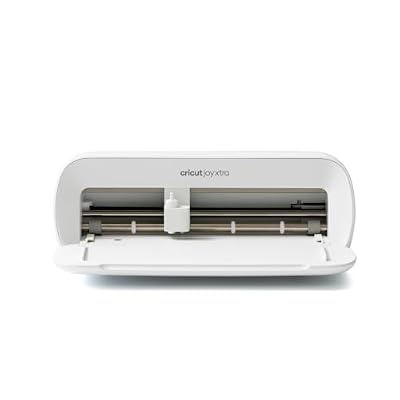
Cricut Joy Xtra - Smart Cutting Machine | Digital Content Bundle
Included for 'Best Vinyl Cutting Machines for Small Business' because the listing specifies Smart Cutting Machine and Digital Content Bundle, details this guide uses to compare options.
View on AmazonThe Joy Xtra is the lowest-risk way to find out whether a sticker, label or small-decal business works for you. It is a compact smart cutting machine that cuts up to 8.5 inches wide, which covers stickers, labels, gift tags, small decals and personalised items, and it comes with a digital content bundle that reduces how much design work you need to do from scratch. For a one-person operation working at a kitchen table, it is the machine that gets out of the way.
Key specs at a glance
- Class: compact smart cutting machine
- Cutting width: up to 8.5 inches
- Included: digital content bundle
- Typical materials: adhesive vinyl, iron-on and cardstock within the machine’s range
- Footprint: very small, desktop or shelf friendly
- Operation: app-driven design and cut workflow
Strengths
The advantage here is focus and cost. It cuts the materials behind most small sticker and label products, it takes up almost no space, and its app-driven workflow means the design process happens on your phone or laptop with a guided, beginner-friendly interface rather than on a machine control panel. That is a faster route from idea to finished item if you are design-led rather than production-led. It is also the quietest and least intimidating machine in this group, which matters if you are cutting late at night in a shared home.
The digital content bundle has real economic value for a new business. Design time is the hidden cost in small-batch vinyl work: an hour of design per product line adds up quickly when your margin per sticker is small. Ready-made content shortens that step, letting you get to a sellable product and then invest in custom design once a line proves itself. The obvious ceiling is width and volume. At up to 8.5 inches wide, the Joy Xtra cannot produce large signage, and it is not built for continuous high-volume runs, so treat it as a validation and small-batch machine rather than a production workhorse.
Pros
- Lowest entry cost of any machine here
- Compact enough for a kitchen table or small shelf
- Digital content bundle saves early design time
- Beginner-friendly app workflow with a light learning curve
- Handles the core materials for stickers, labels and small decals
Cons
- 8.5-inch maximum cut width rules out larger signage
- Not intended for continuous high-volume production
- Fewer specialty tools and materials than a tool-system machine
- App dependency means you need a compatible device to design and cut
How it compares
Against the Cricut Maker 4, the Joy Xtra sacrifices width, material range and tool flexibility in exchange for a much lower price and a smaller footprint. If you are not yet sure which products will sell, that trade is sensible, because the money you save can fund your first batch of materials and packaging. Against the 12-inch VEVOR cutter, the Joy Xtra is narrower but far friendlier to a design-led beginner, and it does not rely on a built-in design library on a small screen. Start here, sell a hundred units, then decide whether you need the Maker 4’s width or a roll-fed plotter’s throughput.
6. Cricut Maker 4 (Seashell) – Best for Mixed-Material Small Businesses

Cricut Maker 4 - Smart Cutting Machine (Seashell) | Digital Content Bundle
Included for 'Best Vinyl Cutting Machines for Small Business' because the listing specifies Smart Cutting Machine (Seashell) and Digital Content Bundle, details this guide uses to compare options.
View on AmazonThe Maker 4 is the machine to buy when your product range is not limited to vinyl. It cuts up to 13 inches wide and uses a swappable tool system, so the same machine handles adhesive vinyl, heat-transfer vinyl for apparel, cardstock, bonded fabric and thicker specialty materials as you add tools. For a small business that sells, say, vinyl decals alongside printed cards, personalised apparel and small packaging inserts, one Maker 4 replaces several single-purpose tools.
Key specs at a glance
- Cutting width: 13 inches
- Tool system: swappable tools and blades for different materials
- Included: digital content bundle
- Finish: seashell
- Typical materials: adhesive vinyl, heat-transfer vinyl, cardstock, bonded fabric and thicker materials within the machine’s range
- Footprint: desktop size, larger than a compact cutter but still bench-top friendly
Strengths
The 13-inch width is the first real advantage: it comfortably covers larger decals, bigger apparel graphics and multi-piece layouts that a compact cutter would force you to split. The second is material breadth. Because tools swap, expanding into apparel, card-making or thicker materials does not mean buying a second machine; it means buying a tool. That is a materially better upgrade path for a business whose product mix is likely to change as it grows. The design software ecosystem is also the most developed of any machine here, which helps with multi-layer vinyl work, print-then-cut projects and creating templates you can reuse across a product line.
Ownership realities matter more on this machine than on the simpler cutters, because the tool system is where the money goes over time. Each new material class you add typically means a matching blade or tool plus the right mat, and that is an investment you should plan rather than discover. The upside is that ongoing vinyl work stays cheap: standard blades, cutting mats and vinyl rolls are the routine consumables, and they are inexpensive per unit when you cut designs that nest well on the mat. A good habit is to plan a cut layout before loading material, because on any mat-based machine, wasted material comes from poor nesting far more often than from machine error.
Pros
- 13-inch cutting width covers larger decals and apparel graphics
- Swappable tool system handles vinyl, iron-on, cardstock and thicker materials
- Strong design software ecosystem for multi-layer and print-then-cut work
- Digital content bundle reduces design time at the start
- Clear upgrade path by adding tools rather than whole machines
Cons
- Premium price tier compared with the budget craft machines
- Specialty tools and mats are extra purchases as you expand materials
- Mat-based workflow means material waste if layouts are not planned
- Still far slower than a roll-fed plotter for bulk runs of one design
How it compares
Against the Brother SDX125EGY, the Maker 4 wins on width, material range and design software depth, while the ScanNCut wins on built-in scanning for cut-around-print accuracy and standalone operation. If you print and then cut, the ScanNCut is the specialist; if you cut a wide range of materials and design in software, the Maker 4 is the more capable all-rounder. Against the Joy Xtra, it is simply a bigger, more expandable version of the same approach, and the upgrade is worth it the moment your designs exceed 8.5 inches or your materials go beyond basic vinyl and cardstock. Against the VEVOR plotters, the Maker 4 gives you material variety and software, while they give you width and volume on standard vinyl at a much lower cost per unit.
How to Choose
Choosing between these machines comes down to measurable factors, not brand preference. Work through the six criteria below in order, and the decision usually makes itself.
Start with your maximum design width
This is the single hardest constraint, because it cannot be worked around. A compact machine that cuts up to 8.5 inches wide, like the Cricut Joy Xtra, cannot produce a 12-inch decal no matter how you arrange the file. A 12-inch class machine such as the VEVOR 12-inch cutter gives you roughly 11 to 11.5 inches of usable width on most designs, which covers laptop decals, cup wraps, small window graphics and most personalised gifts. A 13-inch machine like the Cricut Maker 4 adds a little more headroom plus the ability to lay out multiple pieces at once. The 28-inch VEVOR model, with a stated maximum paper feed of 720 mm, and the 34-inch VEVOR bundle step into signage territory: vehicle door panels, shop window lettering and large decals. Measure your largest realistic product in inches before you buy, add two inches of margin, and pick the smallest machine that clears that number. Buying width you will never use costs money and floor space; buying too little means turning down work.
Match the machine to your dominant material
Vinyl is not one material. Adhesive vinyl for decals and sign vinyl for outdoor graphics behave differently from heat-transfer vinyl used on apparel, and cardstock and bonded fabric behave differently again. If standard cut vinyl is 90 percent of your output, a roll-fed VEVOR plotter gives you the best cost per unit and the fastest runs. If you need heat-transfer vinyl for T-shirts alongside adhesive vinyl for stickers, a tool-system machine like the Cricut Maker 4 lets you switch materials without switching machines. If your product is printed first and cut second, such as printed sticker sheets or shaped cards, only the Brother ScanNCut’s scanning and registration-mark alignment makes that workflow genuinely efficient. Write down your top three materials by volume and check that the machine you are considering handles all three within its supported range.
Weigh the software learning curve honestly
There are three broad software models here. Standalone machines with on-board design libraries, like the VEVOR 12-inch cutter with its 20,000+ built-in designs, let you produce without any design software at all: fastest to first sale, least flexible for custom work. App-driven machines like the Cricut models pair a guided design application with the cutter, which is friendly for beginners but means you design on a device and depend on that ecosystem. Traditional plotter workflows, used with the 28-inch and 34-inch VEVOR machines, assume you create cut files in vector software and send them to the cutter, which is the most flexible and the most demanding to learn. A realistic estimate for a motivated beginner: guided app design becomes comfortable in a few sessions, while a full vector-based plotter workflow with proper weeding and transfer technique typically takes several weeks of regular practice to become reliably productive. If you have never cut vinyl before and need revenue quickly, start at the guided end.
Estimate production speed from how the machine is fed
Speed in vinyl cutting is mostly about handling, not cutting. A mat-based machine requires you to load a sheet, cut, unload, weed and reload for each batch, so throughput is limited by your handling time as much as the machine. A roll-fed plotter lets you run one design repeatedly from a continuous roll, which is why a 34-inch machine can outproduce a desktop cutter many times over on identical decals. A practical way to decide is to count units per typical order. If your orders are one to ten pieces of mixed designs, a mat-based craft machine is fine. If they are twenty or more of the same design, a roll-fed plotter pays for itself in labour quickly. Also account for nesting: the wider the roll, the more copies you fit side by side, and fitting four decals across instead of two roughly halves your material cost per unit and shortens the run.
Plan for noise, space and neighbours
Vinyl cutters are not loud in absolute terms, but they are persistent. A desktop craft machine running in a home office is generally quiet enough to use in the evening without disturbing a household. A wide-format plotter is louder and, more importantly, takes up real space: a 28-inch or 34-inch machine needs a dedicated bench or stand, clearance behind it for the roll to feed without dragging, and a clear area in front for weeding and applying transfer tape. If you work in a shared building, a flat or a room next to a bedroom, the smaller machines are far easier to live with. If you are renting a small unit, measure the bench before ordering, because a 34-inch plotter on the wrong surface produces tracking problems that look like faults.
Calculate total operating cost, not just the machine price
The purchase price is the smallest part of ownership over a year. Build your estimate from five lines: the machine, consumables, software or content subscriptions, replacement parts and your own labour. Consumables are vinyl, transfer tape, cutting mats and blades. As a worked example, imagine you sell a 4-inch decal for a modest price and your material cost per decal is a small fraction of that once you nest several across a roll or mat; the larger variable is handling time, and that is exactly what a roll-fed machine reduces. Replacement parts are dominated by blades and mats: blades dull fastest on abrasive or glitter materials, and mats lose tack fastest when used for paper and cardstock, so keep separate mats for paper and vinyl and replace blades at the first sign of ragged edges rather than after a failed run. Software and content bundles reduce design time but may carry ongoing costs if you rely on subscriber libraries, so decide early whether you will design in house or license content. Finally, price your own time. If a machine saves you an hour per batch of twenty and you produce several batches a week, a mid-range plotter can justify itself within a few months purely through labour savings, while a budget craft machine that costs a quarter as much may be the smarter buy if your volume is still low.
Quick decision matrix by situation
| Your Situation | Best Pick | Why |
|---|---|---|
| Total beginner, small desk, testing whether stickers sell | Cricut Joy Xtra | Lowest cost, up to 8.5-inch cuts, guided app design, compact footprint |
| No design software skills, wants ready-made designs on the machine | VEVOR Vinyl Cutting Machine, 12 in | 20,000+ built-in designs, button and screen control, standalone operation |
| Mixed product range: vinyl, apparel and cardstock | Cricut Maker 4 | 13-inch width, swappable tools, strong design ecosystem |
| Prints designs first, then needs accurate cut-around cuts | Brother SDX125EGY ScanNCut | Built-in scanner reads registration marks, works standalone |
| Sells signage and large decals, limited bench space | VEVOR Vinyl Cutter 28 Inch | 28-inch feed (720 mm), 20 blades included, smaller than a 34-inch machine |
| High-volume repeat decals and full-width signage | VEVOR Vinyl Cutter Machine 34 Inches Bundle | 34-inch roll-fed plotter, best cost per unit, bundle accessories included |
Frequently Asked Questions
What size vinyl cutter do I need for a small business?
Size to your single largest product, not your average. If your biggest seller is a 4-inch sticker, an 8.5-inch or 12-inch machine is plenty. If you produce shop window lettering or vehicle graphics, you need a 28-inch or 34-inch roll-fed plotter. Measure the widest design you realistically expect to sell, add about two inches of margin, and choose the smallest machine that clears that figure.
Can a Cricut machine handle commercial vinyl production?
It can handle small-batch production well, especially mixed-material work where you cut a few pieces of many designs. It becomes a bottleneck when you need long runs of one design, because mat-based machines require loading and unloading for each batch. For high-volume repeat decals, a roll-fed plotter is the more economical tool.
Do I need design software to use a vinyl cutter?
Not always. Some machines, such as the VEVOR 12-inch cutter, include large on-board design libraries and can be run entirely from the machine’s controls. Others rely on a guided app, and professional plotters typically use vector design files. Choose based on how custom your work needs to be and how quickly you need to start selling.
Which materials can these machines cut?
Stand ard adhesive vinyl, heat-transfer vinyl, cardstock and paper are the core materials across this class. Tool-system machines extend further into thicker specialty materials and bonded fabric. Always check the specific machine’s supported material list and use the matching blade, tool and mat, since cutting the wrong material on the wrong mat is the most common cause of poor results.
How often do blades and mats need replacing?
Blades dull faster on abrasive materials such as glitter vinyl and on dense cardstock, and cutting mats lose tack with repeated use, especially when used for paper. Replace a blade when cut edges turn ragged or detailed lettering stops separating cleanly, and keep a separate mat for paper so your vinyl mat stays tacky.
Is a wide-format plotter worth it for a very small business?
Only if you have confirmed demand for wide work. A 28-inch or 34-inch plotter needs a dedicated bench, clearance behind it for the roll, and an operator comfortable with cut files. If most of your orders are small decals, a 12-inch or 13-inch machine will do the same job with less cost and far less space.
How do I cut precisely around printed designs?
You need registration marks printed around the artwork and a machine that can read them. The Brother SDX125EGY ScanNCut has a built-in scanner for exactly this, letting you scan a printed sheet and align the cut path to the artwork without a computer. Manual cutting around printed designs is far slower and inconsistent for repeat products.
What are the ongoing costs of owning a vinyl cutter?
The main recurring costs are vinyl stock, transfer tape, cutting mats, blades and any software or content subscription you choose. Blades and mats are the predictable wear items. If you produce regularly, labour is the largest variable, which is why a roll-fed machine that reduces handling time often pays for itself faster than its price tag suggests.
Final Recommendation
If you are just starting and want the lowest-risk way to test a sticker, label or small-decal business, buy the Cricut Joy Xtra and put the saved money into materials and packaging. If you want a standalone machine that produces sellable items without any design software, the VEVOR 12-inch vinyl cutting machine is the simplest route to a first sale. For a business that sells a mix of vinyl, apparel and cardstock, the Cricut Maker 4 is the best overall pick and the one most likely to keep up as your product range widens. If your product is printed first and cut second, the Brother SDX125EGY ScanNCut is the specialist answer. And if your work has moved to signage, vehicle graphics or bulk repeat decals, choose between the VEVOR 28-inch and 34-inch plotters by measuring your largest panel: 28 inches for a compact bench, 34 inches when full-width jobs are confirmed and volume justifies the space.