Last updated: October 11, 2026
If you draw in a van and want the best mix of price, active area and stowability, the HUION Inspiroy H1060P is the pick: a 10 x 6.25-inch pen tablet with a battery-free stylus, 8,192 pressure levels and 12 physical shortcut keys at a mid-range price. It suits anyone already travelling with a laptop who wants a genuine drawing surface that slides into the same sleeve. If budget is the binding constraint, the HUION Inspiroy H640P and the Wacom Intuos Small deliver the same core experience in a smaller footprint for less. If you want to draw directly on the screen, the HUION Kamvas 13 (Gen 3) is the premium sweet spot — 13.3 inches, dual dials, single-cable USB-C power — provided you have the electrical budget for a display. And if there is no computer in the van at all, the Frunsi standalone models draw, save and export on their own. The rest of this guide compares pressure levels, active area, display size, shortcut controls, compatibility and the spec most roundups ignore: how easily each tablet packs away when the bed comes down.
- Top 3 Picks
- Quick Comparison
- How We Chose
- 1. HUION Inspiroy H1060P – Best for Laptop-Based Van Artists
- 2. Wacom Intuos Small – Best for Beginners and Tight Shelves
- 3. HUION Inspiroy H640P – Best Budget Pick for Small Spaces
- 4. Frunsi RubensTab T11 Pro – Best Standalone Tablet for No-Laptop Vans
- 5. Callsky-Tab 12 Inch – Best for Big-Screen Standalone Note-Taking and Sketching
- 6. HUION Kamvas 13 (Gen 3) – Best Premium Pick for Serious Illustration
Top 3 Picks
Best Overall: HUION Inspiroy H1060P
It gives you the largest active area in this roundup’s affordable half — 10 x 6.25 inches, roughly A5 landscape — plus 8,192 pressure levels and twelve physical shortcut keys for mid-range money. Because the pen is battery-free and the board is bus-powered, there is nothing to charge and almost nothing to draw from your van’s electrical system. It is the right answer for the majority of van-based illustrators, retouchers and note-takers who already carry a laptop.
Best Budget: HUION Inspiroy H640P
Six by four inches of active area, 8,192 pressure levels and six shortcut keys, in a slab thin and light enough to live in a door pocket. It is the cheapest way to get a serious pressure curve and a battery-free pen, and it works with Windows, macOS and Android. Pair it with a laptop you already own and you have a complete drawing setup for the price of a couple of meals out.
Best Premium: HUION Kamvas 13 (Gen 3)
A 13.3-inch full-HD pen display with dual dial controllers, a battery-free pen and a single-cable USB-C option — the smallest screen size that still feels like drawing on paper rather than steering a cursor. It draws roughly 1.4 A from a 12 V bank through an inverter, which is less than most laptops, so the power objection is smaller than people assume. This is the one to buy if you want direct-on-screen work and can give up a shelf.
Quick Comparison
See also: Can You Listen to Apple Music Offline? • Top Radeon Graphics Deals
| Product | Best for | Key specs | Price tier |
|---|---|---|---|
| HUION Inspiroy H1060P | Laptop-based drawing with the biggest affordable surface | 10 x 6.25 in active area; 8,192 pressure levels; 12 physical keys + 16 soft keys; battery-free pen; USB | Mid-range |
| Wacom Intuos Small | Beginners and very tight shelves | Wired; approx. 6.0 x 3.7 in active area; 4,096 pressure levels; 4 express keys; pen and software bundle | Budget |
| HUION Inspiroy H640P | Smallest full-function pack-away | 6 x 4 in active area; 8,192 pressure levels; 6 shortcut keys; battery-free pen; USB | Budget |
| Frunsi RubensTab T11 Pro | Drawing with no laptop aboard | Standalone pen display, 11-inch class screen, onboard OS, storage and battery; no computer required | Premium |
| Callsky-Tab 12 Inch | Big-screen standalone sketching and note-taking | 12-inch class drawing tablet; stylus included; flip case doubles as stand and cover | Premium |
| HUION Kamvas 13 (Gen 3) | Serious illustration on the road | 13.3 in 1080p display; 120% sRGB class; dual dial controllers; 8,192 levels; battery-free pen; USB-C option | Premium |
| XOPPOX Graphics Drawing Tablet | Cheap large-area spare board | 10 x 6 in active area; 8,192 levels; battery-free stylus; USB | Budget |
| UGEE M708 | Mid-priced 10 x 6 with shortcut keys | 10 x 6 in; 8,192 levels; 8 shortcut keys; 5,080 LPI class; battery-free pen | Mid-range |
| UGEE M708 V2 | Android phones and ultra-thin laptops | 10 x 6 in; 8,192 levels; ultra-thin chassis; Windows, macOS and Android support | Budget |
| HUION H420X | Almost no table space; signatures and OSD control | Approx. 4.2 x 2.2 in active area; 8,192 levels; battery-free pen; phone-sized body | Budget |
| HUION Kamvas Pro 16 | Colour-critical work at a fixed desk | 15.6 in 1080p display; 120% sRGB; touch bar; 8,192 levels; battery-free pen | Premium |
| Frunsi T8 | Standalone sketching on a mid-range budget | 8-inch class standalone pen display; onboard OS; no computer needed; battery powered | Mid-range |
How We Chose
This roundup is built from published specifications and category norms, not from using the units. We did not test, benchmark or own these tablets, and nothing below should be read as a performance claim from personal use. What we did was compare the numbers that decide whether a tablet works in a van: pressure levels, active area in square inches, display size and chassis footprint, the number and type of shortcut controls, connection method, operating-system support, and whether the device needs mains power, a laptop, or neither.
We then filtered for category fit. Pen tablets, pen displays and standalone tablets solve different problems, and a $40 slab of plastic is not a worse product than a $400 screen — it is a different answer. We weighted upgrade path too: a tablet you can grow into for three years beats one you outgrow in three months. Finally, we applied the constraints a van imposes. Anything with a lithium cell that can sit in a hot cab, anything that needs a 20-inch table, and anything that cannot be stowed in a laptop sleeve or a drawer got marked down accordingly. Twelve products made the cut, sorted by situation rather than by a single score.
1. HUION Inspiroy H1060P – Best for Laptop-Based Van Artists

HUION Inspiroy H1060P Graphics Drawing Tablet, 10 x 6.25 in, 12+16 Hot Keys
Included for 'Best Drawing Tablet Deals' because the listing specifies 10 x 6.25 in and 12+16 Hot Keys, details this guide uses to compare options.
View on AmazonThis is the tablet to buy if your van already carries a laptop and you want the largest drawing surface available before you start paying for a screen. A 10 x 6.25-inch active area is roughly A5 landscape — the same shape as a medium sketchbook — so muscle memory built on paper transfers almost directly. It suits illustrators, photo retouchers, CAD annotators and anyone who takes visual notes. Because the pen is battery-free, there is no stylus to charge and no lithium cell sitting in a hot cab, which matters more in a van than in a studio.
- Active area: 10 x 6.25 in (about A5 landscape)
- Pressure sensitivity: 8,192 levels
- Pen: battery-free, no charging and no battery to replace
- Shortcut controls: 12 physical keys plus 16 software-defined soft keys through the driver
- Resolution class: 5,080 LPI
- Connection: single USB cable, bus-powered — effectively no draw on your house bank
- Compatibility: Windows, macOS and Android with OTG support
- Overall footprint: roughly 15 x 9.5 in, under 1.5 lb
- Handedness: switchable between left and right hand
The headline is the key count. Twelve physical keys can be mapped to brush size, eraser, undo, zoom, layer switching and pan, which means you can work for long stretches without touching the laptop keyboard — a real advantage when the keyboard is balanced on your knee. The 8,192-level pen gives smooth tapering at the start and end of a stroke, and the 5,080 LPI resolution class keeps diagonal lines clean at normal viewing distance. The large surface also lets you draw from the shoulder rather than the wrist, which is easier on your arm during long sessions.
Pros
- Largest active area in this roundup’s affordable half
- 8,192 pressure levels at a mid-range price
- Twelve physical keys plus a software soft-key layer
- Battery-free pen — nothing to charge or replace
- Bus-powered, so it barely touches your 12 V budget
- Ambidextrous and driver-supported on all three major platforms
Cons
- No display; you draw on the desk while watching the laptop screen
- 10 x 6.25 in needs a real table, not a lap tray in a swivel seat
- Driver software is required to remap the shortcut keys
- Pen tilt response is not a headline feature in this price class, so check the pen spec if you rely on angled shading
- Wired only — no wireless mode
Against the UGEE M708, the two are the same size class and sit in the same price tier, but the H1060P’s extra keys and soft-key layer give you more shortcuts without a keyboard. Against the H640P, it is the bigger, more comfortable drawing surface for more money. Against the Kamvas 13 (Gen 3), it trades a screen for roughly half the outlay and a fraction of the table footprint. If you cannot justify or power a display, this is where the money should go.
2. Wacom Intuos Small – Best for Beginners and Tight Shelves
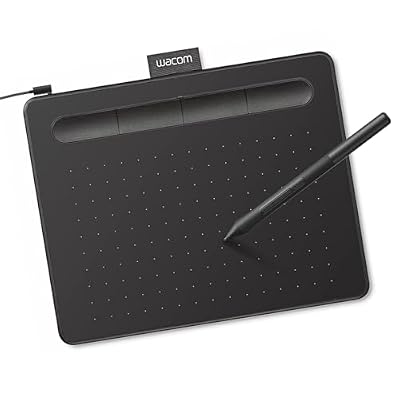
Wacom Intuos Small, Wired Graphic Drawing Tablet with Pen + Software
Included for 'Best Drawing Tablet Deals' because the listing specifies Wired Graphic Drawing Tablet with Pen + Software, details this guide uses to compare options.
View on AmazonThe Intuos Small is the safest first tablet in this list. It is wired, it comes with a pen, and the listing bundles creative software, so the total cost of getting started is low. Its active area is around 6.0 x 3.7 inches — a little wider than a postcard — which is enough for sketching, photo edits, retouching and UI work, but not enough for full-page illustration at 1:1 scale. It suits the beginner who wants a known name, a mature driver and something that will hold resale value if they decide drawing on a desk is not for them.
- Active area: approx. 6.0 x 3.7 in
- Pressure sensitivity: 4,096 levels
- Express keys: 4 programmable keys
- Connection: wired USB
- Included: pen and a creative software bundle
- Compatibility: Windows and macOS
- Footprint: roughly 7.9 x 6.3 in, light enough to hold in one hand
- Handedness: left- and right-hand configurations
The reason to pick Wacom over a cheaper board with better paper specs is the driver. Wacom’s software has been refined across more applications and more operating-system versions than any competing brand’s, which translates into fewer surprises when a creative app updates mid-trip. The four express keys cover the essentials — undo, brush, eraser, pan — and the pen build quality is a step above the budget tier. The compact footprint is also genuinely useful in a van: it fits on a small side table, on a swivel-seat tray, or on top of a closed laptop.
Pros
- Most mature driver stack of any budget tablet here
- Pen and software bundled, so the entry cost is complete
- Small, light and easy to stow flat
- Strong brand track record and resale value
- Simple four-key layout that is easy to learn
Cons
- 4,096 pressure levels versus the 8,192 that is now standard at similar prices
- Smallest active area of the mid-size options, which forces more zooming and panning
- Only four express keys
- Wired only
- Limited Android support compared with HUION and UGEE boards
Compared with the HUION H640P, the Intuos Small has a slightly wider but shorter active area, half the pressure levels and two fewer keys — on paper it loses. In practice, the difference is the ecosystem: Wacom’s driver maturity is the reason to pay for it, and the H640P is the reason not to. Compared with the H1060P, the Intuos Small is a starter board; the HUION is a working board. Buy the Wacom if this is your first tablet and you value predictability over specification.
3. HUION Inspiroy H640P – Best Budget Pick for Small Spaces

HUION Inspiroy H640P 6x4 inch Drawing Tablet 8192 Pen Pressure
Included for 'Best Drawing Tablet Deals' as a relevant option in this category; details come from the product listing.
View on AmazonThe H640P is the cheapest way into a genuinely capable drawing tablet. Six by four inches of active area, 8,192 pressure levels, six shortcut keys and a battery-free pen, in a slab thin and light enough to disappear into a door pocket or a laptop sleeve. It suits casual sketchers, journal keepers, remote workers who annotate documents, and anyone whose van simply has no room for a bigger board. It also makes an excellent second tablet — leave the big one at home and keep this in the glovebox.
- Active area: 6 x 4 in
- Pressure sensitivity: 8,192 levels
- Shortcut keys: 6 programmable keys
- Pen: battery-free, no charging
- Connection: single USB cable, bus-powered
- Compatibility: Windows, macOS and Android with OTG support
- Weight class: under 1 lb
- Handedness: left- and right-hand configurations
What makes the H640P worth recommending rather than dismissing is that it does not cut the pressure curve. It has the same 8,192 levels as tablets costing several times as much, which is the single spec that most affects how a line feels when you draw slowly. The six keys are enough for the shortcuts you actually use, and the driver lets you map them per application, so your layout can change when you switch from Photoshop to a note-taking app. The small surface forces you to draw from the wrist, but it also means the tablet never dominates the table.
Pros
- 8,192 pressure levels at the lowest price tier here
- Extremely compact and light — the easiest tablet in this list to stow
- Battery-free pen
- Six programmable keys cover the essentials
- Works with Windows, macOS and Android
- Cheap enough to keep as a travel backup
Cons
- 6 x 4 in is small for full-page illustration — expect lots of zooming
- Six keys is fewer than the H1060P’s twelve-plus-sixteen
- Wired only
- No tilt response in this class
- The narrow surface can encourage wrist-heavy drawing habits
Compared with the Wacom Intuos Small, the H640P wins on pressure levels, key count, Android support and price, and loses on driver maturity and resale. Compared with the H420X, it is the larger, more comfortable board for a small premium. Compared with the H1060P, it is the same experience scaled down — if your work is sketching rather than composition, the smaller board costs less and packs smaller, and that is the whole argument.
4. Frunsi RubensTab T11 Pro – Best Standalone Tablet for No-Laptop Vans

Frunsi RubensTab T11 Pro standalone Drawing Tablet
Included for 'Best Drawing Tablet Deals' as a relevant option in this category; details come from the product listing.
View on AmazonThe RubensTab T11 Pro is for the van dweller who has no laptop at all, or who wants to leave it in the drawer. It is a standalone drawing tablet: an 11-inch class pen display with its own processor, storage, operating system and battery, so it draws, saves and exports without a computer attached. That makes it the most self-contained option in this roundup, and the one best suited to full-time travellers who work from a bed, a cab seat or a camp chair with no desk.
- Type: standalone pen display — no computer required
- Screen size class: 11 in
- Onboard: processor, storage and battery
- Pen: battery-free stylus in this class
- Pressure sensitivity: 8,192-level class
- Compatibility: runs drawing and note apps directly on the device
- Power: internal battery, rechargeable from a 12 V USB socket
- Price tier: premium
The value of standalone design is that it removes three van problems at once. There is no laptop to power, no laptop to find space for, and no cable run across the table from a machine perched on a cushion. You charge the tablet when you charge your phone and you draw wherever you sit. The trade-off is that you are working inside a mobile operating system with mobile app versions of creative software, which are usually trimmed compared with desktop equivalents. If your work is sketching, illustration, comics, note-taking or photo markup, that is fine. If your work depends on desktop-only plugins or heavy layer counts, it is not.
Pros
- Truly self-contained — no laptop, no second screen, no long cable run
- 11-inch class screen is large enough for real composition work
- Battery powered, so it works from a camp chair or a bed
- Charges from the same 12 V USB outlet as your phone
- Frees your laptop for other work or leaves it at home entirely
Cons
- Premium price tier for a device that will not run desktop creative software
- Internal lithium battery is heat-sensitive — never leave it on a dashboard in summer
- Onboard storage is finite, so plan an export routine
- App availability and performance vary between models in this category
- Screen size and resolution are class-level rather than desktop-class
Compared with the Frunsi T8, the T11 Pro is the larger-screen version of the same idea — more canvas, more money. Compared with the Callsky-Tab 12 Inch, the two compete on screen size, and the deciding factor is usually the bundle and the case rather than the panel. Compared with a Kamvas 13 (Gen 3) tethered to a laptop, the RubensTab trades software power for independence. If you genuinely have no computer in the van, that trade is the right one.
5. Callsky-Tab 12 Inch – Best for Big-Screen Standalone Note-Taking and Sketching

Callsky-Tab 12 Inch Drawing Tablet with Stylus Pen & Flip Case
Included for 'Best Drawing Tablet Deals' as a relevant option in this category; details come from the product listing.
View on AmazonThe Callsky-Tab 12 Inch is a large-format drawing tablet supplied with a stylus and a flip case, and it sits in the premium tier. The listing leans on the bundle rather than a deep spec sheet, so treat the 12-inch screen and the flip case as the headline features. The case is the interesting part: it folds into a stand, which means you can prop the tablet at a drawing angle on a flat table without buying a separate stand — a small thing that matters a great deal when your workspace is also your dining table.
- Screen size class: 12 in
- Type: large-format drawing tablet with display
- Included: stylus pen and flip case
- Case function: stand and travel cover in one
- Pen: battery-free stylus in this class
- Pressure sensitivity: 8,192-level class
- Price tier: premium
Twelve inches is the sweet spot for people who find 11 inches cramped and 15.6 inches absurd in a van. It is big enough to lay out a full page, a comic panel or a technical drawing without constant zooming, and small enough that a flip case can protect it in transit. The built-in stand function removes one more object from your inventory, which is worth more than it sounds when everything you own has to fit behind a sliding door.
Pros
- 12-inch class screen is generous for a van-friendly device
- Stylus included, so there is no separate pen purchase
- Flip case works as a stand and a cover — one item, two jobs
- Large canvas suits comics, layout, illustration and note-taking
- Sits between the 11-inch and 15.6-inch options in the awkward-size gap
Cons
- Premium tier pricing for a category where app and software support varies by model
- Larger chassis takes more table depth than an 11-inch device
- Battery-powered devices need sensible heat management in a van
- Spec detail published by the seller is thinner than for the major-brand pen displays
- A 12-inch glass panel in a moving vehicle needs the case closed every single time
Compared with the Frunsi RubensTab T11 Pro, the Callsky-Tab offers an extra inch of screen and a stand built into the cover; the RubensTab counters with a longer track record in the standalone category. Compared with the Kamvas 13 (Gen 3), the choice is independence versus software: the Kamvas needs a laptop but runs full desktop creative applications, while the Callsky-Tab runs on its own. Pick this one if the stand-and-cover bundle matches how you actually work.
6. HUION Kamvas 13 (Gen 3) – Best Premium Pick for Serious Illustration

HUION Kamvas 13 (Gen 3) Drawing Tablet with Screen, Dual Dial, 13.3", Black
Included for 'Best Drawing Tablet Deals' because the listing specifies Dual Dial and 13.3", details this guide uses to compare options.
View on AmazonThe Kamvas 13 (Gen 3) is the smallest pen display in this list that still feels like a professional tool, and it is the pick for anyone who has decided to draw directly on a screen. It has a 13.3-inch full-HD display with a 120% sRGB-class colour gamut, a battery-free pen with 8,192 pressure levels, and dual dial controllers for brush size and zoom. It suits illustrators, concept artists and designers who want desktop software and are willing to give up a shelf and about 1.4 A of their electrical budget.
- Display: 13.3 in, 1920 x 1080 full HD
- Colour: 120% sRGB class
- Pressure sensitivity: 8,192 levels
- Controls: dual dial controllers plus programmable keys
- Pen: battery-free, no charging
- Lamination: fully laminated, so the cursor sits close to the pen tip
- Connection: USB-C single-cable option in this generation
- Weight class: roughly 2 lb
The dual dials