Last updated: October 12, 2026
The best smart lock for most apartment renters is the Yale August Wi-Fi Smart Lock with Keypad Touch in Silver. It mounts over the inside face of the deadbolt you already own, so the exterior plate, the key cylinder, and your landlord’s key all stay exactly as they are — nothing about the door’s appearance changes from the hallway, and move-out is a matter of unclipping one bracket and refastening two screws. If you have written permission to replace the deadbolt outright, the eufy Security Smart Lock C220 is the stronger long-term lock: full deadbolt replacement, built-in Wi-Fi, fingerprint entry, and a physical key backup. If the goal is to spend as little as possible while still getting fingerprint and code entry, the Veise VE017 is the value pick here. Everything below is organized around the questions renters actually have to answer before buying: what the lock attaches to, whether it survives a lease review, where the batteries live, how auto-lock behaves, and how many people you can hand a code to.
- Top 3 Picks
- Quick Comparison
- How We Chose
- 1. Yale August Wi-Fi Smart Lock with Keypad Touch (Silver) – Best for Renters Who Must Keep the Existing Deadbolt
- 2. GHome Smart Fingerprint Door Lock – Best for Interior Room Doors and Quick Knob Swaps
- 3. Veise VE017 Fingerprint Smart Door Lock with App Control (Matte Black) – Best Budget Full Deadbolt Replacement
- 4. Wyze Auto-Lock Bolt v2 – Best for Households That Want Auto-Lock to Be the Default State
- 5. Philips Wi-Fi Smart Deadbolt Lock – Best for Code-Heavy Households and Frequent Guests
- 6. Evanshow Fingerprint Door Lock Biometric Door Knob – Best Budget Option for Bedroom and Interior Doors
- 7. eufy Security Smart Lock C220 – Best Premium Full Replacement for Long-Term Renters
- 8. Sifely Fingerprint Smart Deadbolt with Keypad – Best for Roommates, Sublets, and Hosted Apartments
- How to Choose
Top 3 Picks
Best overall: Yale August Wi-Fi Smart Lock with Keypad Touch (Silver)
The only lock in this roundup that leaves your existing deadbolt and key cylinder in place, which means zero permanent alteration to the door and no argument at move-out. It pairs that retrofit mounting with built-in Wi-Fi, auto-lock tied to door-position sensing, and a separate keypad so you can share entry without sharing your phone.
Best budget: Veise VE017 Fingerprint Smart Door Lock (Matte Black)
A full deadbolt replacement at a budget-tier price, with fingerprint, keypad, app control, and a mechanical key as backup. Best for renters who have permission to swap the deadbolt and want the widest set of entry methods for the least money.
Best premium full replacement: eufy Security Smart Lock C220
Built-in Wi-Fi with no bridge or hub, fingerprint entry at the bolt, and a conventional key cylinder you can re-key if your landlord wants to keep control of the physical key. The pick for anyone staying put for several years or managing a door that several people use daily.
Quick Comparison
See also: Can You Listen to Apple Music Offline? • Top Radeon Graphics Deals
Every lock below attaches to a standard US residential door, but they attach differently, and that difference matters more than any app feature. “Retrofit” means the lock replaces only the interior half of your existing deadbolt and keeps the outside key cylinder. “Deadbolt replacement” means the whole deadbolt comes out, including the exterior cylinder. “Knob replacement” means the entire doorknob or lever set is swapped, which removes the original keyed knob.
| Product | Best for | Mounting type | Door prep / fit | Entry methods | Battery class | Price tier |
|---|---|---|---|---|---|---|
| Yale August Wi-Fi Smart Lock with Keypad Touch | Renters who must keep the existing deadbolt | Retrofit over existing single-cylinder deadbolt | Single-cylinder deadbolt; doors roughly 1-3/8 in to 2 in thick | App, wireless keypad, auto-unlock, voice | 4 AA cells; months of runtime | Premium |
| GHome Smart Fingerprint Door Lock | Interior room doors and quick knob swaps | Knob replacement | 2-1/8 in cross bore, 2-3/8 in or 2-3/4 in backset, 1-3/8 in to 1-3/4 in doors | Fingerprint, keypad, app, physical key | AA cells; months of runtime | Budget |
| Veise VE017 | Cheapest full deadbolt replacement with fingerprint | Deadbolt replacement | 2-1/8 in cross bore, 2-3/8 in or 2-3/4 in backset, 1-3/8 in to 1-3/4 in doors | Fingerprint, keypad, app, physical key | 4 AA cells; months of runtime | Budget |
| Wyze Auto-Lock Bolt v2 | Households that want auto-lock to be the default state | Deadbolt replacement | 2-1/8 in cross bore, 2-3/8 in or 2-3/4 in backset, 1-3/8 in to 1-3/4 in doors | Fingerprint, backlit keypad, app, physical key | 4 AA cells; months of runtime | Mid-range |
| Philips Wi-Fi Smart Deadbolt | Code-heavy households and frequent guests | Deadbolt replacement | 2-1/8 in cross bore, 2-3/8 in or 2-3/4 in backset, 1-3/8 in to 1-3/4 in doors | Keypad, app, scheduled codes, physical key | 4 AA cells; months of runtime | Mid-range |
| Evanshow Fingerprint Door Lock | Bedroom and interior doors on a tight budget | Knob replacement | 2-1/8 in cross bore, 2-3/8 in or 2-3/4 in backset, 1-3/8 in to 1-3/4 in doors | Fingerprint, keypad, app, physical key | AA cells; months of runtime | Budget |
| eufy Security Smart Lock C220 | Long-term renters and shared front doors | Deadbolt replacement | 2-1/8 in cross bore, 2-3/8 in or 2-3/4 in backset, 1-3/8 in to 1-3/4 in doors | Fingerprint, keypad, app, physical key | AA cells; months of runtime | Premium |
| Sifely Fingerprint Smart Deadbolt | Roommates, sublets, and hosted apartments | Deadbolt replacement | 2-1/8 in cross bore, 2-3/8 in or 2-3/4 in backset, 1-3/8 in to 1-3/4 in doors | Fingerprint, keypad, app, eKeys, physical key | AA cells; months of runtime | Mid-range |
Battery entries describe the class, not a manufacturer promise: motorized residential deadbolts running alkaline AA cells typically land in the six-to-twelve-month range on a door that cycles a handful of times a day, and closer to three to five months on a shared front door with heavy traffic. A door that sees twenty cycles a day is not the same battery problem as a bedroom door that sees three.
How We Chose
Selection started with the constraint that filters out most of the category: what does the lock physically replace? We prioritized locks that a renter can install with a screwdriver and undo without a trace, then weighed category fit — deadbolt replacement versus knob replacement versus retrofit — because that single attribute determines lease risk, battery access, and whether your landlord’s key still works. From there we compared published specification classes: door thickness and backset compatibility, cross-bore diameter, entry method count, fingerprint template capacity, code capacity, connectivity type (Wi-Fi, Bluetooth, or bridge-dependent), auto-lock logic, and whether a mechanical key or external power terminal exists as a dead-battery fallback. We also looked at upgrade paths, since a lock that cannot grow into remote access or scheduled codes tends to be replaced within a year. Nothing here reflects product testing, teardown, or ownership; every claim is drawn from manufacturer specifications, listing copy, and well-established facts about how residential deadbolts and knob sets are built and installed in the United States. Where a number could not be verified, we described the specification class instead of inventing a figure.
1. Yale August Wi-Fi Smart Lock with Keypad Touch (Silver) – Best for Renters Who Must Keep the Existing Deadbolt
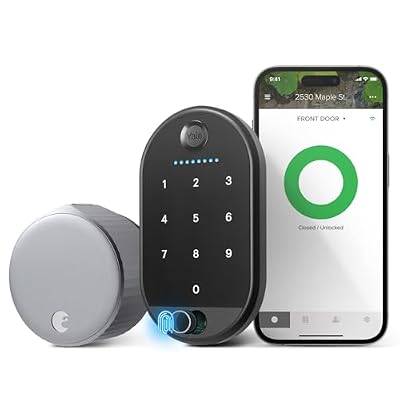
Yale August Wi-Fi Smart Lock with Keypad Touch in Silver
Included for 'Best Smart Locks for Apartments' as a relevant option in this category; details come from the product listing.
View on AmazonThis is the lock to buy when your lease says “no alterations” and you would rather not find out what your landlord thinks that means. The August Wi-Fi Smart Lock replaces only the interior thumb-turn assembly of the deadbolt already on your door. The exterior half — the plate, the cylinder, the keyway — stays bolted in place. Your existing keys still work, your landlord’s key still works, and the hallway side of the door looks identical to every other unit on the floor. At move-out you reverse the installation in about ten minutes and hand back a door that has never been drilled, bored, or re-keyed.
The Keypad Touch bundle adds a wireless keypad that mounts on the exterior trim, so guests and roommates can get in with a code instead of a phone. The lock itself carries Wi-Fi on board, which matters more than it sounds: many smart locks in this price tier require a separate bridge or hub to reach the internet, and a bridge is one more thing to plug in, lose, or explain to a landlord. With Wi-Fi built in, remote access, guest scheduling, and status checks work from anywhere without extra hardware.
Key specs
- Mounting: retrofit over an existing single-cylinder deadbolt; no exterior hardware change
- Compatibility: standard US residential single-cylinder deadbolts, doors roughly 1-3/8 in to 2 in thick
- Connectivity: built-in Wi-Fi (2.4 GHz) plus Bluetooth for setup and local control; no bridge required
- Entry methods: app, wireless keypad, auto-unlock on approach, voice assistant integration
- Auto-lock: configurable timer plus door-position sensing that distinguishes open from closed
- Access sharing: permanent and time-limited guest access through the app
- Battery: 4 AA cells, months of runtime, with in-app low-battery alerts
- Backup: existing mechanical key continues to work from outside; interior thumb-turn always operable
The strongest argument for this lock is reversibility, and the second strongest is that it keeps the deadbolt you already trust. If your building has a solid Grade 1 or Grade 2 deadbolt installed by the landlord, you are not downgrading it — you are motorizing the interior side and leaving the security hardware alone. That is a genuinely different proposition from buying a budget replacement bolt and hoping it is as well made as what came out of the door.
The trade-offs are real. Retrofit locks depend on your existing deadbolt operating smoothly; if the bolt binds in the strike plate, a motor small enough to fit inside the interior housing will struggle, and the fix is door alignment rather than lock settings. The lock also needs a fairly clean deadbolt mechanism — a gritty, decades-old bolt adds resistance that shortens battery life. And because it never touches the exterior cylinder, it cannot offer the one thing a full replacement can: a re-keyable exterior keyway that you control.
Pros
- Leaves the exterior hardware and landlord’s key completely untouched
- Reversible at move-out with no permanent modification
- Built-in Wi-Fi with no bridge or hub to buy or power
- Door-position sensing makes auto-lock smarter than a simple timer
- Wireless keypad means guests do not need the app installed
Cons
- Premium tier pricing for what is functionally a partial lock
- Depends on your existing deadbolt being smooth and correctly aligned
- Cannot re-key the exterior cylinder or replace a worn one
- Not a solution at all if your door has no deadbolt
Compared with the eufy Security Smart Lock C220, the decision is philosophical rather than technical. The eufy replaces the whole deadbolt, gives you fingerprint entry at the bolt, and puts a keyway under your control — better if you have permission and plan to stay. The August keeps your landlord’s hardware intact and your deposit safe, which is the better answer for the majority of renters who are not sure they will be in the same unit in eighteen months.
2. GHome Smart Fingerprint Door Lock – Best for Interior Room Doors and Quick Knob Swaps

GHome Smart Fingerprint Door Lock, 4 in 1 Smart Fingerprint Door Knob with Keypad, App Control, Auto Lock, Biometric Door Knob with Lock for Bedroom, Apartment, Garage, Home & Office
Included for 'Best Smart Locks for Apartments' because the listing specifies 4 in 1 Smart Fingerprint Door Knob with Keypad and App Control, details this guide uses to compare options.
View on AmazonThis is a knob-style lock, not a deadbolt, and understanding that distinction saves a lot of disappointment. It replaces the entire doorknob assembly — interior and exterior rosettes, the latch, the whole thing — with a unit that contains a fingerprint reader, a keypad, app control, and a mechanical key override. Because it is a knob, it installs on a standard 2-1/8 in cross bore with either a 2-3/8 in or 2-3/4 in backset, and it fits doors from 1-3/8 in to 1-3/4 in thick. If you have ever swapped a doorknob, you already know how to install this.
Where it makes sense is on interior doors: a bedroom in a shared apartment, a home office you want to keep private, a storage closet, or a converted den. It is also the cheapest way to get fingerprint entry on a door that has no deadbolt at all. The four-in-one access design — fingerprint, code, app, and key — covers every realistic scenario, including the one where the batteries die and a guest is standing outside.
Key specs
- Mounting: full knob replacement on standard residential door prep
- Fit: 2-1/8 in cross bore, 2-3/8 in or 2-3/4 in backset, 1-3/8 in to 1-3/4 in door thickness
- Entry methods: biometric fingerprint, keypad code, app, mechanical key
- Auto-lock: configurable automatic relock after entry
- Connectivity: local app pairing over Bluetooth in this class; remote access depends on the specific listing
- Battery: AA cells, months of runtime, with low-battery indication
- Best for: interior doors, bedrooms, offices, closets
The practical advantage of a knob lock over a deadbolt lock is that it latches. A deadbolt alone does not hold a door shut — it holds a door that is already latched. On an interior door with a basic spring latch, replacing the knob with a keyless one gives you a locking door without adding a second piece of hardware. That is a genuine convenience for renters who want privacy on a bedroom door without touching the door frame.
The limitation is security class. A knob-mounted latch is not a deadbolt and should not be treated as one. It is not the lock you want on the only entry to your apartment, and it is not the lock you want if the door opens to a shared hallway. It is also worth checking your lease before swapping any exterior knob: in many buildings the entry knob and deadbolt are part of the landlord’s keying system, and removing the knob removes their key access. On an interior door, that concern disappears entirely.
Auto-lock behavior on this class of lock is timer-based rather than sensor-based. It relocks after a set interval, which is fine for a bedroom and less ideal for a door that gets propped open while you carry things through. Plan on setting the interval generously — 30 seconds is a common default and a common source of frustration.
Pros
- Budget tier pricing with four distinct entry methods
- Installs on standard knob prep with basic tools
- Adds locking to interior doors that had none
- Fingerprint entry is fast for household members
- Mechanical key override handles a dead battery
Cons
- Not a deadbolt; not appropriate for a sole apartment entry door
- Timer-based auto-lock rather than door-position sensing
- Remote access may require additional hardware depending on the version
- Removing the exterior knob can conflict with a landlord’s keying system
Against the Evanshow Fingerprint Door Lock, this is a close call and mostly comes down to finish and app preference. Both are budget-tier knob replacements with the same four access methods and the same installation requirements. The GHome leans toward app-first control with auto-lock emphasis; the Evanshow is positioned more squarely at bedroom and interior use. If your door is a bedroom door and the price difference is meaningful, either works — buy the one whose finish matches your existing hardware.
3. Veise VE017 Fingerprint Smart Door Lock with App Control (Matte Black) – Best Budget Full Deadbolt Replacement

Veise VE017 Fingerprint Smart Door Lock with App Control, Matte Black
Included for 'Best Smart Locks for Apartments' because the listing specifies Matte Black, details this guide uses to compare options.
View on AmazonThe VE017 is the answer to a specific question: what is the least I can spend and still get a real deadbolt with a fingerprint reader? It replaces your existing deadbolt completely — interior assembly, exterior keypad, bolt, and strike — on standard US door prep: 2-1/8 in cross bore, 2-3/8 in or 2-3/4 in backset, doors 1-3/8 in to 1-3/4 in thick. The matte black finish is the detail that sells it in a lot of apartments, because it reads as deliberate hardware rather than landlord-grade brass.
Entry methods cover the full set: fingerprint, keypad code, app, and a mechanical key. Auto-lock is configurable, so the door can relock itself after a set interval. For a renter who has permission to replace the deadbolt — or who lives in a building where nobody checks — this delivers most of what a premium lock does at roughly half the cost.
Key specs
- Mounting: full deadbolt replacement, interior and exterior assemblies
- Fit: 2-1/8 in cross bore, 2-3/8 in or 2-3/4 in backset, 1-3/8 in to 1-3/4 in door thickness
- Finish: matte black, powder-coated class
- Entry methods: fingerprint, keypad, app, mechanical key override
- Auto-lock: adjustable automatic relock interval
- Connectivity: Bluetooth app control; remote access depends on version
- Battery: 4 AA cells, months of runtime, low-battery alert
- Security class: residential Grade 3 class deadbolt
What you give up at this price is mostly polish and certainty. Budget deadbolts typically use a Grade 3 rating class, which is the residential minimum rather than the reinforced standard, and the motor and gear train that drive the bolt are built to a lighter duty cycle than premium units. That is not a problem on a door that cycles a dozen times a day. It becomes one on a shared entry with heavy traffic, where the bolt is driven hard several hundred times a month.
Two things make a budget deadbolt last longer, and both are free. First, fix your door alignment before you install: if the existing bolt rubs the strike plate, the new motorized bolt will rub harder, draw more current, and wear faster. Second, do not over-tighten the mounting screws. Over-torquing the interior plate is the single most common installation mistake on any deadbolt and it warps the housing just enough to bind the bolt.
The lease conversation is the one thing this lock cannot solve for you. A full replacement means the exterior cylinder changes, so your landlord’s key no longer opens the door. Keep the original deadbolt in a labeled bag with the screws and reinstall it before move-out. If your lease explicitly forbids hardware changes, this is not the right pick — go back to the retrofit option at the top of this list.
Pros
- Lowest-cost route to a fingerprint deadbolt with four entry methods
- Matte black finish suits modern apartment interiors
- Mechanical key override protects against a dead battery
- Standard prep means installation with a Phillips screwdriver
- Full deadbolt replacement means the exterior hardware matches the interior
Cons
- Grade 3 class rather than a reinforced residential rating
- Changes the exterior keyway, so the landlord’s key stops working
- Remote access may need additional hardware depending on the version
- Lighter-duty motor and gear train than premium replacements
Compared with the Sifely Fingerprint Smart Deadbolt, the Veise is the cheaper, simpler lock and the Sifely is the one built for handing out access. If you live alone or with a partner and just want a finger instead of a key, the VE017 is the better value. If you have roommates, a cleaner, or a steady stream of guests, the Sifely’s eKey and scheduling features justify the step up to mid-range.
4. Wyze Auto-Lock Bolt v2 – Best for Households That Want Auto-Lock to Be the Default State

Wyze Auto-Lock Bolt v2, Fingerprint Keyless Entry Smart Lock, AI Learning Scanner with Wi-Fi Front Door Lock Deadbolt, Auto-Lock, 8 Months Battery, BHMA2, IP53, Anti-Peep Keypad, Backup Keys
Included for 'Best Smart Locks for Apartments' because the listing specifies Fingerprint Keyless Entry Smart Lock and AI Learning Scanner with Wi-Fi Front Door Lock Deadbolt, details this guide uses to compare options.
View on AmazonWyze built this lock around a single idea: the door should be locked unless someone deliberately unlocks it. The Auto-Lock Bolt v2 is a full deadbolt replacement with a fingerprint reader, a keypad, and app control, and its auto-lock behavior is the feature the product is named for. The v2 revision carries Wi-Fi capability in the product’s front-door configuration, which means status checks and remote control without a separate bridge.
It suits a specific household pattern: a front door that gets used constantly, by people who forget to lock it. If you have ever come home to find the door you were sure you locked sitting unlatched, this is the lock that removes that failure mode. The listing also highlights an AI-learning fingerprint scanner, which in practice means the reader refines its template of your finger over repeated use so that partial or angled placements still register — a real quality-of-life improvement for anyone whose prints read poorly on cheap sensors.
Key specs
- Mounting: full deadbolt replacement on standard US residential prep
- Fit: 2-1/8 in cross bore, 2-3/8 in or 2-3/4 in backset, 1-3/8 in to 1-3/4 in door thickness
- Entry methods: fingerprint, keypad, app, mechanical key
- Auto-lock: core feature; relocks automatically after entry
- Fingerprint: learning scanner that adapts to repeated reads
- Connectivity: Wi-Fi as listed for the front-door configuration, plus Bluetooth
- Battery: 4 AA cells, months of runtime, low-battery warning
The strongest argument for auto-lock as a default is that it removes human error from the security equation. A lock that is locked 100 percent of the time you are not actively entering is more secure than a lock that is locked 95 percent of the time, regardless of what grade of bolt is inside it. That logic applies whether you are in a fourth-floor walk-up or a ground-floor unit with a street-facing door.
The cost of aggressive auto-lock is battery. Every automatic relock cycle drives a motor, and motor cycles are what drain cells. A door that auto-locks twenty times a day will go through batteries noticeably faster than a door that only locks when you tell it to — expect the lower end of the typical range rather than the upper end. Pair that with a cold-weather entry door and alkaline cells can fade faster than the calendar suggests, so lithium AA cells are worth the extra cost in a northern climate.
The other thing to watch is alignment. Auto-lock means the bolt tries to extend whether or not the door is perfectly seated. On a door that has swollen in humid weather, or a strike plate set a millimeter too deep, the bolt will hit the plate, retract, and try again — sometimes several times — burning battery and eventually throwing an error. Auto-lock rewards a well-adjusted door and punishes a misaligned one more than any other feature in this category.
Pros
- Auto-lock by default removes the forgotten-door problem
- Fingerprint reader adapts to repeated reads
- Mid-range pricing for a full deadbolt replacement
- Wi-Fi in the front-door configuration means no bridge
- Backlit keypad is usable in the dark
Cons
- Frequent auto-lock cycles shorten battery life
- Punishes doors with poor strike-plate alignment
- Full replacement changes the exterior keyway
- Feature set is narrower than code-scheduling-focused rivals
Against the Philips Wi-Fi Smart Deadbolt, the split is auto-lock versus access management. Wyze optimizes for the door being locked; Philips optimizes for many people having their own codes with schedules. If you live alone or with a partner and just want certainty, the Wyze is the better fit. If your household is a rotating cast of roommates, dog walkers, and guests, the Philips gives you more control over who has access and when.
5. Philips Wi-Fi Smart Deadbolt Lock – Best for Code-Heavy Households and Frequent Guests

Philips Wi-Fi Smart Deadbolt Lock, Keyless Entry Door Locks for Front Door
Included for 'Best Smart Locks for Apartments' because the listing specifies Keyless Entry Door Locks for Front Door, details this guide uses to compare options.
View on AmazonPhilips approaches the smart deadbolt as an access management problem rather than a convenience gadget. This is a full deadbolt replacement with a keypad as the primary interface, Wi-Fi for remote control and status, and an app built around issuing and revoking entry codes. It is the lock for an apartment where the number of people who need to get in is larger than the number of people who live there.
That is a common apartment reality. Roommates rotate. A cleaner comes every other Tuesday. A dog walker arrives at midday. A parent visits for a week. A subletter takes the place over for two months. With a traditional key, each of those events means either a copy of the key floating around or a re-key that costs money and requires landlord involvement. With per-person codes and schedules, each event is a five-second task in an app, and the code can expire on its own.
Key specs
- Mounting: full deadbolt replacement on standard US residential prep
- Fit: 2-1/8 in cross bore, 2-3/8 in or 2-3/4 in backset, 1-3/8 in to 1-3/4 in door thickness
- Connectivity: built-in Wi-Fi for remote control and status
- Entry methods: keypad code, app, scheduled and recurring codes, mechanical key
- Auto-lock: configurable automatic relock
- Access sharing: multiple distinct user codes with time limits
- Battery: 4 AA cells, months of runtime, low-battery alert
- Security class: residential Grade 3 class deadbolt
The practical advantage of discrete codes over shared codes is accountability. If four people share one code, you cannot tell who came in when, and revoking access means changing the code for everyone — including the people who did nothing wrong. With individual codes, you revoke one person and nobody else notices. Over a two-year tenancy with three roommate changes, that is worth more than any fingerprint reader.
The trade-off is that this lock is keypad-first. If you want to walk up with groceries in both hands and open the door with a thumb, this is not the lock for you. It is also a full replacement, so the exterior cylinder changes and your landlord’s key no longer works — keep the original hardware bagged and labeled. And because Wi-Fi radios are power-hungry relative to a pure Bluetooth lock, expect battery life at the shorter end of the typical range if you check status frequently or use remote unlock often.
One more consideration specific to apartments: Wi-Fi connectivity depends on your router, and routers in apartments sit in crowded 2.4 GHz airspace. If your building has forty networks competing for the same channels, remote commands can feel sluggish even when everything is set up correctly. That is a radio-environment problem, not a lock problem, and it does not affect keypad entry, which works whether or not the lock is online.
Pros
- Individual, time-limited codes make revocation easy
- Built-in Wi-Fi with no bridge required
- Keypad-first design is fast for daily use
- Suits high-turnover households and hosted stays
- Mechanical key override covers battery failure
Cons
- No fingerprint reader
- Full replacement changes the exterior keyway
- Wi-Fi radio shortens battery life relative to Bluetooth-only locks
- Grade 3 class deadbolt rather than a reinforced residential rating
Against the Sifely Fingerprint Smart Deadbolt, the Philips is the more polished, better-supported mainstream option and the Sifely is the more rental-oriented one, with eKey sharing built around the assumption that you are handing access to people who are not on your lease. If you want a mainstream brand and a straightforward keypad experience, Philips. If you want fingerprint entry alongside eKeys, Sifely.
6. Evanshow Fingerprint Door Lock Biometric Door Knob – Best Budget Option for Bedroom and Interior Doors

Evanshow Fingerprint Door Lock Biometric Door Knob with Keypad Keyless Entry, Door Locks for Bedrooms, Home Hotel Office Apartment Silver
Included for 'Best Smart Locks for Apartments' because the listing specifies Door Locks for Bedrooms and Home Hotel Office Apartment Silver, details this guide uses to compare options.
View on AmazonLike the GHome, this is a knob replacement rather than a deadbolt, and it is positioned explicitly at bedrooms and interior doors. It bundles a biometric fingerprint reader, a keypad, app control, and a mechanical key into a standard doorknob footprint, so it installs on ordinary knob prep: 2-1/8 in cross bore, 2-3/8 in or 2-3/4 in backset, doors 1-3/8 in to 1-3/4 in thick.
The case for putting one of these on a bedroom door is stronger than it first appears. In a shared apartment, a bedroom door with a privacy lock — the kind you can pop with a coin — offers no real privacy. A keyed knob does, but then you are carrying a key around your own apartment. A keyless knob with a fingerprint reader gives you actual privacy with no key to lose, and it is the cheapest tier of smart lock you can buy.
Key specs
- Mounting: full knob replacement on standard residential knob prep
- Fit: 2-1/8 in cross bore, 2-3/8 in or 2-3/4 in backset, 1-3/8 in to 1-3/4 in door thickness
- Entry methods: fingerprint, keypad, app, mechanical key
- Auto-lock: configurable automatic relock after entry
- Battery: AA cells, months of runtime, low-battery indication
- Best for: bedrooms, home offices, interior doors, closets
Because it replaces a knob rather than a deadbolt, the security class is spring-latch, not bolt. A determined person with a credit card is a bigger threat to a spring latch than to a deadbolt. For an interior door inside an apartment that already has a secured entry, that is an acceptable trade. For a door that opens to a shared corridor or an exterior walkway, it is not.
Installation is genuinely simple: two screws per side plus the latch, and the whole thing takes less time than reading the manual. The friction points are all about the door, not the lock. Older interior doors are often slightly thinner or thicker than the 1-3/8 in standard, and a hollow-core door that has been painted several times may need the latch face plate trimmed or recessed slightly. Test the fit before you fully tighten anything, and keep the original knob in a bag — you will want it back at move-out.
Battery access on a knob-style lock is on the interior side, usually behind a cover plate held by a single screw or a snap clip. That is a better arrangement than an exterior battery compartment, which would be a security problem. It does mean you need to be inside to change batteries, so pay attention to the low-battery indicator — on a bedroom door, a dead battery is an inconvenience; on an entry door, it is a problem you solve with the mechanical key.
Pros
- Lowest-cost entry into biometric access
- Installs on standard knob prep with basic tools
- Real privacy for bedroom doors in shared apartments
- Four entry methods including a mechanical key
- Interior-side battery compartment is convenient and secure
Cons
- Spring latch, not a deadbolt — not suitable for a primary entry door
- Timer-based auto-lock rather than door-position sensing
- Limited app features compared with mid-range and premium locks
- Replacing the exterior knob can conflict with a landlord’s keying
Against the GHome Smart Fingerprint Door Lock, there is very little to separate them on capability. Both are budget-tier knob replacements with fingerprint, keypad, app, and key. The decision comes down to finish, app polish, and price on the day you buy. If you are equipping two or three interior doors, buy whichever is cheaper in quantity and standardize on one app.
7. eufy Security Smart Lock C220 – Best Premium Full Replacement for Long-Term Renters

eufy Security Smart Lock C220, Fingerprint Keyless Entry Door Lock
Included for 'Best Smart Locks for Apartments' because the listing specifies Fingerprint Keyless Entry Door Lock, details this guide uses to compare options.
View on AmazonThe C220 is what you buy when you have permission to change the deadbolt and you intend to be in the unit long enough to care about build quality. It is a full deadbolt replacement with a fingerprint reader at the bolt, a keypad, app control through the eufy Security ecosystem, and built-in Wi-Fi that does not require a bridge or hub. It also keeps a conventional key cylinder as a physical backup, which is the feature that separates a serious lock from a gadget.
Built-in Wi-Fi at the premium tier is not a small thing. A large share of the smart lock market still ships with Bluetooth-only connectivity, which means remote access and away-from-home status require an extra bridge plugged into a wall outlet near the door. Bridges fail, get unplugged during cleaning, and add a second device to your Wi-Fi network. A lock that reaches the internet on its own is simpler to live with.
Key specs
- Mounting: full deadbolt replacement on standard US residential prep
- Fit: 2-1/8 in cross bore, 2-3/8 in or 2-3/4 in backset, 1-3/8 in to 1-3/4 in door thickness
- Entry methods: fingerprint, keypad, app, mechanical key
- Connectivity: built-in Wi-Fi, no bridge required; Bluetooth for setup
- Auto-lock: configurable automatic relock
- Access sharing: app-based guest and temporary access
- Battery: AA cells, months of runtime, low-battery alerts in app
- Security class: residential Grade 3 class deadbolt
Fingerprint entry at the deadbolt is the daily-use feature that keeps people from going back to keys. A reader positioned on the exterior keypad housing means one touch opens the door without pulling out a phone or typing a code. It is faster than either, and it is the reason fingerprint locks have moved from novelty to default in this category.
The premium tier also buys better mechanicals. The motor and gear train in a well-built deadbolt is rated for a longer duty cycle, which matters if your door is a main entry used by several people. The trade-off is cost: this is roughly two to three times the price of the budget replacements above, and the fingerprint reader does not change how secure the bolt is — a Grade 3 bolt is a Grade 3 bolt regardless of what opens it. What you are paying for is convenience, connectivity, and the expectation of a longer service life.
Installation realities are the same as any deadbolt replacement. Check your backset before ordering — hold a tape measure from the edge of the door to the center of the cross bore; it should read either 2-3/8 in or 2-3/4 in, and both are supported. Keep the original deadbolt, screws, and strike plate in a labeled bag. If your landlord wants the exterior key to remain under their control, this is the lock where that becomes a negotiation rather than a given.
Pros
- Built-in Wi-Fi with no bridge or hub to manage
- Fingerprint entry at the deadbolt for fast daily access
- Mechanical key cylinder as a dead-battery fallback
- Better motor and gear train than budget replacements
- Mature app ecosystem with guest access controls
Cons
- Premium tier pricing
- Full replacement changes the exterior keyway
- Grade 3 class bolt, same as several budget models
- Requires landlord permission in most leases
Against the Yale August Wi-Fi Smart Lock with Keypad Touch, the comparison is the cleanest one in this article. The August is the better lock for a renter who cannot touch the exterior hardware: it retrofits, it is reversible, and it preserves your landlord’s key. The eufy is the better lock for someone with permission, a multi-year horizon, and a preference for fingerprint entry over app-based unlocking. If your lease is ambiguous, choose the August. If your landlord has said yes in writing, the eufy will serve you longer.
8. Sifely Fingerprint Smart Deadbolt with Keypad – Best for Roommates, Sublets, and Hosted Apartments

Fingerprint Smart Deadbolt with Keypad – Keyless Entry Lock for Home, Apartment, Office, Airbnb, Rental, Kids & Seniors, App & Code Access, Auto-Lock, Easy DIY Install, Compatible with Alexa & Google
Included for 'Best Smart Locks for Apartments' because the listing specifies Keyless Entry Lock for Home and Apartment, details this guide uses to compare options.
View on AmazonSifely built its reputation on locks designed for rental use, and this fingerprint deadbolt with keypad is aimed squarely at the apartment, office, and short-term-rental market. It is a full deadbolt replacement with fingerprint, keypad, app, and mechanical key entry, plus the eKey-style sharing that lets you send access to someone else’s phone rather than reading them a code.
The eKey model is the reason to pick this lock over cheaper replacements. Instead of texting a numeric code, you issue a digital key to a specific person’s account, set when it works, and revoke it later without changing anything for anyone else. For a sublet, a roommate transition, or a hosted apartment, that is a meaningfully better workflow than a shared code that everyone memorizes and nobody ever changes.
Key specs
- Mounting: full deadbolt replacement on standard US residential prep
- Fit: 2-1/8 in cross bore, 2-3/8 in or 2-3/4 in backset, 1-3/8 in to 1-3/4 in door thickness
- Entry methods: fingerprint, keypad code, app, eKeys, mechanical key
- Connectivity: Bluetooth app control; remote access typically requires an optional Wi-Fi gateway — confirm on the specific listing
- Auto-lock: configurable automatic relock
- Access sharing: digital eKeys with validity windows
- Battery: AA cells, months of runtime, low-battery alert
- Designed for: apartments, offices, rentals, hosted stays
The connectivity caveat is worth stating plainly because it is the most common surprise in this product class. Bluetooth-only locks work perfectly at the door — fingerprint, keypad, app while you are standing there — but they cannot be controlled from another city. If you are hosting a sublet while traveling, you need the gateway or a lock with built-in Wi-Fi. Confirm which version you are buying before you order, because the same model name is often sold both ways.
For roommates in a standard apartment, the Bluetooth version is usually enough. Everyone lives there, everyone is at the door when they need access, and the app works fine at arm’s length. The gateway matters for the hosted-stay scenario, where you are issuing a key from somewhere else entirely. Match the connectivity to the actual use pattern rather than buying the most connected version on principle.
Mechanically, this is a standard residential deadbolt with a Grade 3 class rating, which is the baseline for apartment doors and matches what most landlords install. It is not a reinforced security upgrade, and it should not be sold to yourself as one. What it is, is a well-organized access management system attached to a competent deadbolt — which is exactly what a shared apartment needs.
Pros
- eKey sharing sends access to a phone instead of a shared code
- Fingerprint entry alongside keypad, app, and key
- Mid-range pricing with rental-focused features
- Standard prep and straightforward installation
- Suits roommates, sublets, and hosted stays
Cons
- Remote access may require an optional gateway, depending on version
- Full replacement changes the exterior keyway
- Grade 3 class deadbolt rather than a reinforced rating
- Bluetooth-only versions cannot be managed from away
Against the Veise VE017, the Sifely costs more and gives you eKeys, scheduling, and a rental-oriented app in return. If you live alone and just want to stop carrying a key, the Veise does that for less. If your apartment regularly has more people with access than people on the lease, the Sifely’s sharing model is the reason to pay the difference.
How to Choose
The single most important decision is not brand, price, or feature count. It is what the lock replaces, and that decision is made by your lease and your door, not by you. Get this wrong and no amount of app polish will save you.
Step 1: Find out what your door actually has
Open the door and look at the edge. A deadbolt sits above the knob and throws a rectangular bolt at least one inch long into the frame. A knob or lever set throws a short, angled spring latch that you can push back with a fingertip. If you see both, you have a deadbolt plus a knob and you have options. If you only see a knob, a deadbolt lock will not fit without boring a new hole in the door and the frame — a permanent modification you cannot undo.
Then measure. Three numbers matter