Last updated: October 4, 2026
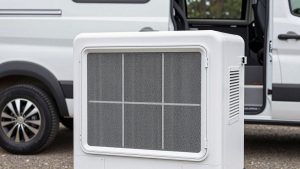
The Starlink Standard Kit is the most capable way to get fast, low-latency internet in a van, RV, or remote cabin when cell coverage runs out, and for full-time van lifers who work remotely it is often the difference between staying on the road and heading back to town. It bundles the V4 Standard dish, a kickstand, and a tri-band Wi-Fi 6 router, and on a clear view of the sky it delivers speeds good enough for video calls, streaming, and large uploads.
The downsides are power and size. The Standard dish draws far more power than the smaller Starlink Mini, it needs its router and AC power supply in its stock form, and it is bulky to set up and pack away every day. The hardware usually costs around $300–$350 before promotions, and you also need a monthly service plan; Roam-type plans are the ones built for travel. If you mostly move daily on a modest solar setup, consider the Mini. If you stay put for days, have a robust battery and inverter, or want the best performance, the Standard Kit is the stronger choice.

STARLINK Standard Kit AX 4 X Tri Band Wi-Fi System - High-Speed, Low-Latency V4 Internet Band AC Wi-Fi Router and Satellite Dish System – High-Speed Portable Internet – White
Included for 'Starlink Standard Kit Review: Pros, Cons and Who It's For' as a representative home product in this roundup; selection reflects the product set returned for this topic.
View on AmazonWho It’s For and Who It Isn’t
- Great for: remote workers living in a van or RV who need reliable video calls; boondockers who stay at a site for several days; weekend cabins and off-grid land.
- Great for: travelers with a 2,000 Wh-plus battery bank, a decent inverter, and solar that can cover the daily draw.
- Not ideal for: small vans with minimal electrical systems, where the Mini’s lower draw makes more sense.
- Not ideal for: people who need internet in motion on the highway, unless their plan, mounting, and local rules allow in-motion use.
- Not ideal for: campsites under dense forest canopy, where any satellite dish struggles.
Key Specs
See also: How Many Watts of Solar Do You Need for Van Life? • Truma vs Webasto Water Heaters for Vans: Combi, Aquago and Alternatives
| Spec | Starlink Standard Kit (V4) |
|---|---|
| In the box | Standard dish, kickstand, Gen 3 router, cables, router power supply |
| Dish size | About 23 x 15 inches |
| Dish weight | About 6.4 lb (without kickstand and cable) |
| Weather rating | IP67 dish |
| Typical power draw | Roughly 75–100 W average |
| Router | Tri-band Wi-Fi 6, coverage up to about 3,200 sq ft |
| Aiming | Manual, guided by the Starlink app (no motors) |
| Hardware price range | Usually $300–$350; promotions are common |
What Stands Out
Performance that supports real work
With a clear sky view, Starlink typically delivers download speeds well above most rural cellular connections and latency low enough for video conferencing and online gaming. For remote workers, the consistency is what matters: fewer dropped calls and uploads that actually finish.
Simple app-guided setup
The V4 Standard does not have motors. You set it on the kickstand, open the Starlink app, and the app tells you which direction to face it. Once aimed, it connects within minutes. The app also has an obstruction checker that uses your phone camera to show where trees or buildings will block the signal.
A real router
The included Gen 3 router is tri-band Wi-Fi 6, which comfortably covers a van, an RV, and the campsite around it. It also offers Ethernet ports for a wired laptop or a mesh node.
Built for weather
The IP67-rated dish handles rain and dust, and it has a snow-melt feature that increases power use in freezing conditions.
Trade-offs for Van Life
- Power draw: at roughly 75–100 W average, running it 10 hours a day uses around 0.75–1 kWh. That is a meaningful share of a typical van battery and solar budget, especially in winter.
- AC power in stock form: the kit is designed to run from its router power supply on household AC, so you need an inverter. Third-party DC conversion kits exist but are unofficial, can affect warranty, and require care.
- Size: roughly 23 by 15 inches plus the kickstand takes real storage space. Permanent roof mounts solve that but add cost and drilling.
- Obstructions: trees and canyon walls cause brief dropouts. You will start choosing campsites by sky view.
- Ongoing cost: service plans are monthly and change often. Check current Roam or travel-plan pricing and data terms before buying.
Setup Tips for Vans and RVs
- Run the obstruction check first at every new campsite before you set up the dish.
- Place the dish away from the vehicle on the kickstand when you can; a roof mount is convenient but parked under trees it loses signal.
- Size your inverter properly. A pure sine wave inverter with plenty of headroom above 100 W, plus the rest of your loads, avoids brownouts.
- Use a schedule. Power the system only during work hours to save battery, or use the app’s power-saving options if your plan supports them.
- Protect the cable. Route it through a window or a cable gland rather than pinching it in a door.
- Keep the box or a padded bag. The dish surface should be protected when stored while driving.
Alternatives
Starlink Mini: much smaller, lighter, runs on DC power with a much lower draw, and has a built-in Wi-Fi router. It suits small vans and daily movers, with somewhat lower peak performance than the Standard.
Flat High Performance and enterprise kits: designed for permanent mounting and in-motion use, but far more expensive and power-hungry.
Cellular hotspots with a roof antenna: cheaper hardware and far lower power use, but only as good as local cell coverage. Many van lifers carry both and switch depending on location.
FAQ
Can I use it while driving?
The Standard dish is not designed for in-motion use in its standard kickstand form. Check Starlink’s current plan terms and mounting guidance before attempting it.
Does it work in national forests and BLM land?
Yes, anywhere within Starlink’s service area with a clear view of the sky. Open BLM land is usually ideal; dense forest is the hardest case.
Verdict
The Starlink Standard Kit is the performance choice for van and RV internet. It brings reliable speeds to places cell towers never reach, as long as you have the power system and storage space to support it. Lighter setups should start with the Mini; working nomads with solid electrical systems will appreciate the Standard’s extra headroom.