Last updated: October 11, 2026
The best studio monitors for a home studio are the PreSonus Eris E5: a 5.25-inch bi-amped near-field pair with balanced XLR and TRS inputs alongside unbalanced RCA, usable output down to roughly 50 Hz, and onboard tuning controls that let you compensate for a desk pushed against a wall. They suit anyone mixing at 0.8–1.5 m in a room under about 15 m² who wants honest midrange instead of flattering bass. If your budget is tight or your desk is shallow, the PreSonus Eris 3.5 is the smarter first pair — it will not reach the bottom octave, but it will teach you what your mix actually sounds like in the midrange. If you can spend more and want a tighter, more forward presentation, the Yamaha HS4 is the premium step-up that still fits a bedroom desk. And if your mixes keep collapsing on the low end, the PreSonus Eris Sub 8 extends any pair in this guide below 40 Hz. The rest of this guide compares woofer size, room suitability, bass response, near-field placement, connectivity and the acoustic limits no monitor can escape.
- Top 3 Picks
- Quick Comparison
- How We Chose
- 1. PreSonus Eris 3.5 — Best for Tight Budgets and Small Desks
- 2. Ortizan C7 — Best for Wireless-First Desks
- 3. Edifier MR3 — Best for Hi-Res Listening and Light Mixing
- 4. Mackie CR3.5 — Best for Tone Tweaking on a Budget
- 5. PreSonus Eris E5 — Best Overall for Small Home Studios
- 6. Yamaha HS4 — Best Premium Step-Up for Small Rooms
- 7. PreSonus Eris Sub 8 — Best for Adding Real Low End
- 8. M-Audio BX3 — Best for Beginners Who Want Input Flexibility
- 9. Edifier R1280T — Best for Dual-Purpose Listening and Monitoring
- 10. Vondynote Clamp Speaker Stands — Best for Getting Monitors Off the Desk
- 11. Yamaha HS3 — Best Premium Compact for Very Small Desks
Top 3 Picks
Best overall: PreSonus Eris E5
A 5.25-inch bi-amped near-field with XLR, TRS and RCA inputs, around 50 Hz of real low-end extension and front-panel tuning controls for rooms where the desk sits close to a wall. It is the smallest pair in this guide that lets you hear a kick drum and a bassline as separate events rather than one blurred event. Buy it if you mix at a metre or more and your room is bigger than a wardrobe.
Best budget: PreSonus Eris 3.5
A compact 3.5-inch active pair with a front-firing port, a headphone jack and a volume knob within arm’s reach. It will not reproduce sub-bass, but the midrange is honest enough to expose mud, harshness and balance problems. It suits first-time buyers, small desks and anyone who wants to learn before spending.
Best premium: Yamaha HS4
The HS4 brings Yamaha’s famously flat, slightly forward HS voicing into a compact cabinet with room-control and high-trim switches, XLR and TRS inputs, and low-end response in the 60 Hz region. It is unforgiving on purpose: a bad mix sounds bad, which is the point. Choose it if your room is already reasonably treated and you want a reference that stays useful as your skills grow.
Quick Comparison
See also: Can You Listen to Apple Music Offline? • Top Radeon Graphics Deals
| Product | Best for | Key specs | Price tier |
|---|---|---|---|
| PreSonus Eris 3.5 | First pair, small desks, tight budgets | 3.5″ woofer, 1″ silk dome tweeter, ~25 W per side, front-firing port, TRS + RCA in, front headphone out, ~80 Hz–20 kHz | Budget |
| Ortizan C7 | Wireless-first desks, casual listening and light editing | Compact powered pair, Bluetooth 5.3, wired analogue input, black cabinet, desktop footprint | Budget |
| Edifier MR3 | Hi-Res listening plus light mixing | 3.5″-class woofer, silk-dome tweeter, bi-amped, Hi-Res Audio certification, Bluetooth plus wired inputs, MDF cabinet | Mid-range |
| Mackie CR3.5 | Tone shaping on a budget | 3.5″ woofer, tone knob for tonal adjustment, front-panel volume and headphone jack, aux input, black finish | Budget |
| PreSonus Eris E5 | Best overall for small home studios | 5.25″ woofer, 1″ silk dome tweeter, ~80 W bi-amped Class AB, XLR + TRS + RCA, acoustic tuning controls, ~53 Hz–22 kHz | Mid-range |
| Yamaha HS4 | Premium step-up for small rooms | ~4.5″ woofer, bi-amped, XLR and TRS inputs, room control and high trim switches, low end around 60 Hz | Premium |
| PreSonus Eris Sub 8 | Adding genuine low end to any pair above | 8″ front-firing driver, 50 W per listing, variable crossover, polarity switch, Bluetooth on this version, output down to ~30 Hz | Premium |
| M-Audio BX3 | Beginners who want input flexibility | 3.5″ Kevlar woofer, 1″ silk dome tweeter, ~25 W per side, TRS + RCA in, front aux in and headphone out, ~80 Hz–22 kHz | Budget |
| Edifier R1280T | Dual-purpose listening and monitoring | 4″ woofer, 13 mm silk dome tweeter, ~21 W per channel, dual RCA inputs for two sources, front bass port, MDF cabinet | Mid-range |
| Vondynote clamp speaker stands | Getting monitors off the desk surface | Set of two clamp-mounted desktop stands, steel construction, adjustable height and tilt, short profile for near-field use | Budget |
| Yamaha HS3 | Premium compact for very small desks | 3.5″-class woofer, bi-amped, XLR and TRS inputs, room control and high trim switches, low end around 70 Hz | Premium |
| Yamaha HS5 | Mixing in a treated small room | 5″ woofer, 1″ dome tweeter, ~70 W bi-amped, XLR + TRS, room control and high trim, ~54 Hz–30 kHz | Premium |
How We Chose
This guide is built from published manufacturer specifications, documented input and output configurations, and the well-understood physics of small untreated rooms — not from listening sessions. Every product listed was judged on six things: driver size and the low-frequency extension that size realistically supports; cabinet and amplifier class, because a 3.5-inch driver in a plastic box behaves differently from the same driver in a braced MDF cabinet; input types, since balanced connectivity determines whether you can run long cables without hum; placement flexibility, including whether the port fires forward (desk-friendly) or rearward (wall-sensitive); the presence of tuning controls such as high trim, low cut or a tone knob, which matter more in a small room than in a large one; and the upgrade path, meaning whether the monitor can stay in service when you add an interface, a subwoofer or a treated corner.
We also weighted category fit heavily. A premium monitor that out-resolves an untreated bedroom is a worse purchase than a mid-range monitor that matches it, and a subwoofer is a better use of money than a bigger woofer when your room already has a hole between 50 and 120 Hz. Products that only make sense as part of a system — the subwoofer and the desk stands, for example — are assessed by what they add to the pairs above them rather than in isolation. Nothing here is claimed as tested; the numbers are the manufacturers’ and the reasoning is acoustic.
1. PreSonus Eris 3.5 — Best for Tight Budgets and Small Desks

PreSonus Eris 3.5 Powered Studio Monitors, Pair — 3.5” Active Near
Included for 'Best Studio Monitors for a Home Studio' because the listing specifies Pair — 3.5” Active Near, details this guide uses to compare options.
View on AmazonThis is the pair to buy when the desk is 100–120 cm wide, the room is a bedroom, and the alternative is mixing on laptop speakers or a gaming headset. The Eris 3.5 is a genuinely compact active near-field that sits either side of a laptop with room to spare, and it is the entry point most people should take before they know whether they enjoy mixing at all. It suits listening distances of roughly 0.6–1 m, which is exactly the distance a typical bedroom desk forces on you.
Key specs
- 3.5-inch woven-composite woofer with a 1-inch silk-dome tweeter
- Roughly 25 W per speaker, Class AB amplification, sold as a pair
- Front-firing bass port, so the cabinet is far less fussy about sitting near a wall than a rear-ported design
- Balanced 1/4-inch TRS and unbalanced RCA inputs
- Front-panel volume control and headphone output
- Usable response in the 80 Hz–20 kHz region; expect meaningful roll-off below about 70 Hz
Strengths
The midrange is the reason to buy it. Small drivers with a modest cabinet tend to sound boxy and hollow, but this one keeps vocals and guitars recognisable, which is what you need when you are learning to hear balance. The front port is a real practical advantage in a bedroom: you can push the cabinet to within 10–15 cm of the wall behind it without the bass turning into a single booming note. The front-panel headphone jack means you can mute the room and check a mix on headphones without unplugging anything, and the volume knob is where your hand already is. It also has the advantage of being the cheapest way into the same ecosystem as the Eris E5 and the Eris Sub 8, so an upgrade later is a straight swap rather than a rebuild.
Pros
- Honest, uncoloured midrange for the price band
- Front-firing port makes wall placement workable
- Front headphone jack and volume control are genuinely useful daily
- Very small footprint on a crowded desk
- Clean upgrade path to a 5-inch pair or the matching subwoofer
Cons
- No sub-bass: kick drums and low bass lines lose their weight and pitch definition
- No XLR input, so long cable runs are more prone to hum
- Limited output before the amplifier and driver start complaining
- No meaningful tuning controls for taming a bright or boomy room
How it compares
The nearest alternative in this list is the M-Audio BX3, which occupies almost the same size and price class but adds a front aux input and a headphone output in a slightly more consumer-friendly package. The M-Audio is a touch more forgiving on placement; the PreSonus is a touch more neutral in the mids. If you can stretch to the Edifier R1280T, you gain a 4-inch woofer and noticeably more low end, but you lose the near-field voicing and the balanced TRS input — the Edifier is a bookshelf speaker that doubles as a monitor, not the other way around.
2. Ortizan C7 — Best for Wireless-First Desks

Ortizan C7 Powered Studio Monitors Pair with Bluetooth 5.3, Black
Included for 'Best Studio Monitors for a Home Studio' because the listing specifies Black, details this guide uses to compare options.
View on AmazonThe C7 exists for a specific kind of desk: one with no audio interface, no spare inputs on the computer, and a person who wants sound coming out of two boxes within five minutes of unboxing. It is a compact powered pair in black with Bluetooth 5.3 on board, which means a phone, a tablet or a laptop can drive it directly. It suits producers who mostly sketch ideas, stream reference tracks and edit video, rather than anyone chasing a flat response for critical mixing.
Key specs
- Compact powered desktop monitor pair, black finish
- Bluetooth 5.3 wireless input plus wired analogue connectivity
- Built-in amplification — no separate receiver or interface required
- Desktop-scale cabinet, intended for listening distances under about 1 m
- Typical of the class: a small woofer in the 3–4 inch range with a dome tweeter
Strengths
Convenience is the whole product. Bluetooth 5.3 is a modern implementation with better power efficiency and connection stability than the 4.x generations, and it removes the cable clutter that makes small desks unworkable. For listening to reference material — which is a genuinely important part of learning to mix — being able to play a track from your phone without rerouting your entire setup lowers the friction enough that you will actually do it. Setup is a power cable and a pair of speaker wires, which matters if you are in a rented room and cannot drill or run cable trunking.
Pros
- Wireless input removes the need for an audio interface to get started
- Modern Bluetooth 5.3 for stable, low-fuss streaming
- Small, light, easy to move between desks and rooms
- Lowest barrier to entry of anything in this guide
Cons
- Wireless latency makes it unsuitable for tracking or playing virtual instruments in real time
- Bluetooth codecs add compression, so it is not a reference signal path
- Published specifications are thinner than the established studio brands, so buying blind is riskier
- No balanced inputs, and limited headroom compared with a bi-amped monitor
How it compares
The natural rival is the Edifier MR3, which also offers Bluetooth but pairs it with Hi-Res Audio certification and a more monitor-oriented voicing. If your priority is convenience above all, the Ortizan wins on simplicity and price. If you want the wireless convenience without giving up on accuracy, the MR3 is the more sensible compromise, and the PreSonus Eris 3.5 is the better choice still if you are willing to give up Bluetooth entirely in exchange for a more honest midrange.
3. Edifier MR3 — Best for Hi-Res Listening and Light Mixing
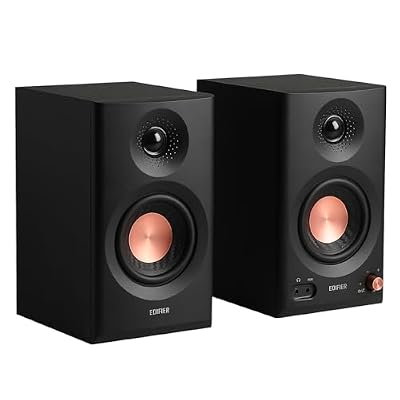
Edifier MR3 Powered Studio Monitor, Speaker Hi-Res Active Bluetooth Speaker
Included for 'Best Studio Monitors for a Home Studio' because the listing specifies Speaker Hi-Res Active Bluetooth Speaker, details this guide uses to compare options.
View on AmazonThe MR3 is aimed at the person who wants one pair of speakers to do two jobs: play music properly and serve as a workable monitor for editing, podcasting and casual mixing. It carries Hi-Res Audio certification, which in practice means the digital signal path is capable of handling high-resolution sample rates without unnecessary downsampling. It suits a desk where the speakers sit 0.6–1.2 m from your ears and you are not expecting to master a record on them.
Key specs
- 3.5-inch class woofer with a silk-dome tweeter, bi-amplified
- Hi-Res Audio certification per the product listing
- Bluetooth plus wired analogue inputs
- MDF cabinet rather than moulded plastic — heavier, less resonant
- Compact near-field footprint intended for desktop use
Strengths
The cabinet material is the quiet advantage here. MDF is denser and better damped than the plastic shells used at the very bottom of the market, and a stiffer cabinet means less of the midrange is smeared by panel resonance. That shows up as clearer separation between instruments at moderate volumes, which is precisely the volume range a bedroom studio operates in. The Hi-Res certification is a useful signal that Edifier has paid attention to the digital stage, and the Bluetooth input means the speakers are not chained to your interface. The overall voicing is slightly warm rather than clinically flat, which makes long listening sessions less fatiguing but also means you should check low-end decisions on a second system.
Pros
- MDF cabinet gives cleaner mids than plastic-shell rivals
- Hi-Res certified digital path handles high sample rates
- Bluetooth plus wired inputs covers both work and leisure
- Balanced enough for editing and content work
- Sits comfortably between budget and premium pricing
Cons
- 3.5-inch driver limits how much low end you can trust
- No balanced XLR connectivity
- Warm voicing can flatter poorly balanced mixes
- Less headroom than a 5-inch bi-amped monitor at higher volumes
How it compares
The closest alternative in this guide is the Edifier R1280T, which uses a larger 4-inch woofer and a wood-finish MDF cabinet but has no Bluetooth and is voiced for bookshelf listening rather than near-field work. If wireless is essential, the MR3 is the better pick. If you want the most low end per unit of money and do not care about Bluetooth, the R1280T gives you more. Against the PreSonus Eris 3.5, the MR3 wins on cabinet quality and features and loses on neutrality.
4. Mackie CR3.5 — Best for Tone Tweaking on a Budget

Mackie CR3.5 Studio Monitors (Pair), 3.5" Woofers, Tone Knob, Black
Included for 'Best Studio Monitors for a Home Studio' because the listing specifies 3.5" Woofers and Tone Knob, details this guide uses to compare options.
View on AmazonMackie’s CR series has been the default first-monitor recommendation for years, and the CR3.5 adds something the cheaper options lack: a tone knob. That single control lets you tilt the overall balance warmer or brighter, which is a crude but effective way to compensate for a desk that sits in a corner or a room with a hard floor. It suits beginners who want to hear a difference immediately and who are not yet ready to invest in acoustic treatment.
Key specs
- 3.5-inch woofer, sold as a pair, black finish
- Front-panel tone knob for adjusting the overall tonal balance
- Front-panel volume control and headphone output
- Auxiliary input on the front for quick phone or tablet connection
- Desktop near-field scale, intended for listening distances around 0.6–1 m
Strengths
The tone knob is the reason to choose this over a cheaper pair. In a small room, the biggest problems are usually a boomy upper bass caused by corner placement and a harsh top end caused by a bare desk and a window behind you. A single tilt control will not fix either properly, but it will let you dial the speakers into a state where you can work, and it teaches you what “too bright” and “too thick” actually sound like. The front-panel layout is genuinely useful: volume, headphone jack and aux input all face you, which makes the speakers behave like a small mixer as well as a monitor pair.
Pros
- Tone knob gives real, audible control over the balance
- Front aux input and headphone jack make it a mini hub
- Simple, unfussy setup with no interface required
- Well-established brand with a long service history in this class
Cons
- Not a neutral monitor — the tone control is a workaround, not a correction
- 3.5-inch driver still cannot deliver sub-bass
- No balanced inputs
- Less low-end extension than a 4-inch bookshelf design
How it compares
Against the PreSonus Eris 3.5, the Mackie trades a little midrange honesty for a lot of user control — if you are fighting your room rather than your mix, the tone knob is worth more than the flatter response. Against the M-Audio BX3, both offer front-panel convenience, but the Mackie’s tone control is the more useful feature for a beginner, while the M-Audio’s Kevlar woofer tends to hold together slightly better at higher volumes.
5. PreSonus Eris E5 — Best Overall for Small Home Studios

PreSonus Eris E5 2-Way 5.25" Near Field Studio Monitor
Included for 'Best Studio Monitors for a Home Studio' as a relevant option in this category; details come from the product listing.
View on AmazonThis is the pair most home studios should end up with. A 5.25-inch woofer is the smallest size that delivers usable low end in a normal bedroom, the cabinet is a proper braced design rather than a desktop accessory, and the input panel covers XLR, TRS and RCA — meaning it works with a cheap interface today and a better one in three years without any adapter shopping. It suits listening distances of roughly 0.8–1.5 m and rooms between about 8 and 18 m².
Key specs
- 5.25-inch woofer with a 1-inch silk-dome tweeter
- Roughly 80 W of bi-amped Class AB power per cabinet
- Balanced XLR and 1/4-inch TRS inputs plus unbalanced RCA
- Acoustic tuning controls — high-frequency trim and a low-cut filter for taming desk and wall reinforcement
- Usable response from around 53 Hz to 22 kHz
- Front-panel volume and power, rear-mounted input panel
Strengths
The tuning controls are what separate this from the budget tier. A low-cut filter is not a gimmick: if your desk sits 20 cm from the wall, you are getting a broad lift somewhere in the 100–200 Hz region, and rolling off the bottom of the monitor is often the fastest way to hear what is actually in the mix. High-frequency trim does the same job at the other end for bare rooms with glass and hard floors. Beyond that, the 5.25-inch driver reaches low enough that you can hear the fundamental of a bass guitar rather than just its harmonics, which is the single biggest jump in usefulness between a 3.5-inch and a 5-inch monitor. Balanced XLR inputs mean you can run long cables from an interface without picking up hum, and the RCA input lets a phone or turntable in without rewiring.
Pros
- Genuine low-end extension for a desktop-sized monitor
- XLR, TRS and RCA inputs cover every realistic source
- Onboard tuning controls compensate for small-room problems
- Substantial power headroom for a room this size
- Upgrades cleanly to a subwoofer or a larger interface
Cons
- Noticeably larger footprint than any 3.5-inch pair here
- Wants at least 0.8 m of listening distance to integrate properly
- No wireless input of any kind
- Class AB amplification runs warmer than a class-D design
How it compares
The nearest alternative is the Yamaha HS4. The Yamaha is more forward and more revealing in the upper mids, with room-control switches that are slightly better implemented for taming a bright room — but it costs more and its roughly 4.5-inch woofer does not reach as low as the PreSonus. Against the Yamaha HS5, the E5 gives up some midrange precision and a little low-end extension, and gains RCA connectivity and a lower price. If your room is untreated and your budget is finite, the E5 is the better match; if your room is treated and you want to hear your mistakes clearly, step up to the HS5.
6. Yamaha HS4 — Best Premium Step-Up for Small Rooms
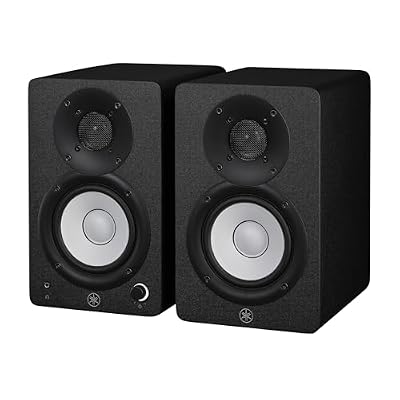
Yamaha HS4 Powered Studio Monitor in Black, Pair (HS4 B)
Included for 'Best Studio Monitors for a Home Studio' because the listing specifies Pair (HS4 B), details this guide uses to compare options.
View on AmazonThe HS4 is the compact member of Yamaha’s HS family, and it inherits the voicing that made the larger models a fixture of professional rooms: flat through the midrange, slightly forward in the presence region, and deliberately unflattering. It suits a small studio that already has some treatment — a couple of bass traps and something on the first reflection points — and a producer who wants to hear problems rather than be soothed by them.
Key specs
- Woofer in the 4.5-inch class with a 1-inch dome tweeter
- Bi-amplified, with separate amplification for woofer and tweeter
- Balanced XLR and TRS inputs
- Room control and high trim switches for compensating for wall and corner placement
- Low-end response in the region of 60 Hz
- Sold as a pair in black
Strengths
The voicing is the product. Yamaha’s HS monitors are known for a midrange that does not hide anything, and that is exactly what you want when you are learning: if a vocal is harsh on these, it is harsh, and you will fix it. The room control switch applies a low-frequency shelf that reduces the boom you get from putting a speaker near a wall or in a corner, and the high trim does the equivalent for a live-sounding room. Together they give you two useful corrections without any outboard gear. The cabinet is also solidly built, with the sort of damping that keeps panel resonance out of the midrange — a real difference from budget boxes, and one you notice most on dense mixes with a lot of layered guitars or synths.
Pros
- Revealing, professional-style voicing that exposes mix problems
- Room control and high trim switches for real-world placement
- Solid, well-damped cabinet
- Compact enough for a small desk while still sounding substantial
- Holds its value and stays useful as skills improve
Cons
- Unforgiving of poor mixes, which is discouraging for absolute beginners
- Costs noticeably more than a mid-range 5-inch monitor with deeper bass
- No RCA input, so consumer sources need an adapter
- Bass extension is limited by the cabinet size
How it compares
Against the PreSonus Eris E5, the HS4 is the more analytical monitor with the shallower bass — a straight trade of low-end extension for midrange honesty. Against the Yamaha HS3, the HS4 buys you a larger woofer, deeper bass and more headroom for a modest increase in footprint; if your desk is genuinely narrow, the HS3 is the only one that will fit, but the HS4 is the better long-term purchase for anyone with 120 cm of desk width.
7. PreSonus Eris Sub 8 — Best for Adding Real Low End

PreSonus Eris Sub 8 Bluetooth Powered Desktop Studio Subwoofer 50W Black
Included for 'Best Studio Monitors for a Home Studio' as a relevant option in this category; details come from the product listing.
View on AmazonEvery 3.5-inch and 4-inch monitor in this guide rolls off before the bottom octave of a bass guitar, which means you are mixing the most important part of modern music by guesswork. The Eris Sub 8 is the fix: an 8-inch powered subwoofer with a variable crossover that slots underneath a desktop pair and takes over below roughly 80 Hz. It suits anyone whose mixes translate badly on car stereos and phones, and who has already accepted that a bigger monitor is not an option on a small desk.
Key specs
- 8-inch front-firing driver, 50 W of amplification per the listing
- Variable crossover so the sub hands over to your monitors at the right frequency
- Polarity switch for aligning the sub with the main pair
- Bluetooth input on this version, plus wired connectivity
- Output extending down to roughly 30 Hz
- Desktop-scale cabinet designed to sit under a desk
Strengths
A subwoofer changes what you can hear more than any other purchase at this price. Below about 80 Hz you stop hearing pitch and start feeling weight, and without that information you cannot tell whether a kick drum and a bassline are fighting each other. The variable crossover is the critical control: set it too high and the sub duplicates the monitors, producing a thick lump in the upper bass; set it correctly, around the point where your monitors naturally roll off, and the two blend into one continuous system. The polarity switch lets you correct for the phase difference that appears when the sub sits at a different distance from your ears than the mains. The Bluetooth input is a bonus that makes the sub usable for casual listening when your interface is off.
Pros
- Extends any pair in this guide down to roughly 30 Hz
- Variable crossover and polarity control allow proper integration
- Small enough to fit under a desk or in a corner
- Makes mixing bass decisions possible rather than guesswork
- Bluetooth input adds everyday listening value
Cons
- Low frequencies excite room modes, so it can sound worse before it sounds better
- Placement matters enormously and a bad position ruins the result
- Adds a second box and two more cables to a small desk
- Premium price for something that does not improve the midrange at all
How it compares
The alternative to buying a subwoofer is buying a bigger monitor — in this list, the Yamaha HS5 or the PreSonus Eris E5. A 5-inch monitor reaches the 50 Hz region, which is enough for most rock and pop but not for electronic music or film work. The sub goes a full octave lower and lets you keep the compact monitors you already own. If your room is small and square, however, a sub can be a liability; the honest recommendation is to buy the bigger monitor first and add the sub only when you know your room can handle the low end.
8. M-Audio BX3 — Best for Beginners Who Want Input Flexibility

M-AUDIO BX3 3.5" Wired Studio Monitors Pair
Included for 'Best Studio Monitors for a Home Studio' as a relevant option in this category; details come from the product listing.
View on AmazonThe BX3 is a direct competitor to the PreSonus Eris 3.5 and the Mackie CR3.5, and it wins on one specific axis: front-panel access. The auxiliary input and headphone output sit on the front baffle alongside the volume control, which makes it the friendliest speaker in this guide for someone who constantly swaps between a phone, a laptop and headphones. It suits absolute beginners building a first desk on a budget.
Key specs
- 3.5-inch Kevlar woofer with a 1-inch silk-dome tweeter
- Roughly 25 W per speaker, sold as a wired pair
- Balanced 1/4-inch TRS and unbalanced RCA inputs on the rear
- Front-panel auxiliary input, headphone output and volume control
- Usable response in the 80 Hz–22 kHz region
Strengths
Kevlar is a stiff, light cone material, and stiffness is what keeps a small woofer from distorting when it is asked to play loud. In practice the BX3 holds its composure at moderate volumes better than plastic-cone budget rivals, which means you can monitor at a realistic level without the mids turning to mush. The front-panel layout is the other real strength: being able to plug a phone straight into the front, mute the room with a headphone jack and adjust volume without reaching behind the desk makes the speakers far more likely to be used every day. It is also the least intimidating product here for someone who has never owned a monitor pair.
Pros
- Kevlar woofer resists distortion at moderate volumes
- Front aux input and headphone jack are genuinely convenient
- Balanced TRS input allows a proper interface connection
- Very approachable price point for a first pair
Cons
- Still no sub-bass — the 3.5-inch driver limits what you can trust
- No XLR input
- No tone or room-correction controls
- Limited headroom compared with any 5-inch monitor
How it compares
Against the PreSonus Eris 3.5, the BX3 offers more front-panel convenience and a stiffer cone, while the PreSonus offers a slightly more neutral voicing and a front-firing port that is friendlier to wall placement. Against the Mackie CR3.5, the M-Audio has the better driver material but the Mackie has the tone knob. If you cannot decide between them, buy on the feature that matches your room: tone control if your room is problematic, a stiffer woofer if you monitor at higher volumes.
9. Edifier R1280T — Best for Dual-Purpose Listening and Monitoring

Edifier R1280T Powered Bookshelf Speakers -2.0 Near Field Studio Monitor
Included for 'Best Studio Monitors for a Home Studio' as a relevant option in this category; details come from the product listing.
View on AmazonThe R1280T is a bookshelf speaker that has been adopted as a near-field monitor, and it is honest to call it that. It uses a 4-inch woofer in a wood-finish MDF cabinet, offers two RCA inputs so a computer and a turntable can both stay connected, and sounds considerably fuller than any 3.5-inch monitor here. It suits people who want one pair of speakers for both work and pleasure, and who mix at low-to-moderate volumes.
Key specs
- 4-inch woofer with a 13 mm silk-dome tweeter
- Roughly 21 W per channel, 2.0 configuration, sold as a pair
- Dual RCA inputs for connecting two sources simultaneously
- Front-firing bass port
- MDF cabinet with a wood-effect finish
- Response extending down toward the 55 Hz region in the manufacturer’s specification
Strengths
The 4-inch woofer is the headline. It gives you roughly half an octave more usable low end than a 3.5-inch driver, which is the difference between hearing a bassline as a pitch and hearing it as a thump. The dual RCA inputs are unusually practical: you can leave your computer connected to one and a turntable, phone or TV to the other and switch without crawling behind the desk. The MDF cabinet with a wood finish also behaves better than plastic, and it looks like furniture rather than equipment — a genuine consideration in a shared living space. The front port means you can place it near a wall, which is where bookshelf speakers usually end up.
Pros
- 4-inch woofer delivers noticeably more low end than 3.5-inch rivals
- Two RCA inputs let two sources stay permanently connected
- MDF cabinet with a furniture-grade finish
- Front port tolerates close-to-wall placement
- Comfortable for long listening sessions
Cons
- Voiced for listening, not for critical work — the mids are warm and slightly recessed
- No balanced inputs and no Bluetooth on this model
- Less headroom and less precise imaging than a purpose-built near-field
- Not the right tool if your priority is accurate midrange translation
How it compares
The direct alternative is the Edifier MR3, which adds Bluetooth and Hi-Res certification but uses a smaller 3.5-inch-class driver. If you need wireless, take the MR3; if you want the most bass per unit of money and do not care about streaming, the R1280T is the better buy. Against the PreSonus Eris 3.5, the Edifier wins on low-end extension and loses on midrange neutrality — a fair summary of the difference between a bookshelf speaker and a monitor.
10. Vondynote Clamp Speaker Stands — Best for Getting Monitors Off the Desk

Vondynote Set of 2 Desktop Clamp Speaker Stands Short Studio Monitor Stands
Included for 'Best Studio Monitors for a Home Studio' as a relevant option in this category; details come from the product listing.
View on AmazonThese are the cheapest upgrade in this guide and, in a small room, often the one you feel most. A pair of clamp-mounted desktop stands lifts your monitors off the desk surface, raises the tweeters toward ear height and removes the resonance that a desk contributes when a speaker sits directly on it. They suit anyone whose monitors currently sit on a wooden desk at chest height, which is almost everyone.
Key specs
- Set of two clamp-style desktop speaker stands
- Steel construction with a clamp that grips the desk edge
- Adjustable height and tilt to aim the tweeter at ear level
- Short profile intended for near-field monitors on a desk
- Fits standard desk-top thicknesses; check the clamp range against your desk before buying
Strengths
Two physical problems get solved at once. The first is desk reflection: when a speaker sits on a hard surface, the sound radiating downward bounces back up and arrives at your ears a fraction of a millisecond late, which comb-filters the upper midrange and makes it impossible to judge tone accurately. Lifting the cabinet removes most of that reflection. The second is height: a tweeter should sit at or slightly below ear level, and most monitors on a normal desk point at your chest. Clamp stands raise them without needing floor space, which matters in a room where the desk is already against a wall. Decoupling the cabinet from the desk also stops the desk acting as a passive radiator, which cleans up the upper bass considerably.
Pros
- Removes desk reflection, which is one of the biggest problems in a small room
- Raises tweeters to ear height for correct vertical alignment
- Frees desk surface without consuming floor space
- Inexpensive relative to the audible improvement
Cons
- Requires a desk edge with clearance underneath for the clamp
- Weight capacity limits them to desktop-sized monitors
- Adds two more objects to an already crowded desk
- Cheap stands can transmit vibration if the clamp is not tightened properly
How it compares
There is no direct equivalent in this list, because the alternative is doing nothing — leaving the monitors on the desk with their own feet. That is free, but it costs you accuracy: the desk reflection and the wrong tweeter height together do more damage to what you hear than the difference between two adjacent price tiers of monitor. If your desk has no usable edge, foam isolation pads are the next best option; they address the vibration but not the height.
11. Yamaha HS3 — Best Premium Compact for Very Small Desks

Yamaha HS3 Powered Studio Monitor in Black, Pair (HS3 B)
Included for 'Best Studio Monitors for a Home Studio' because the listing specifies Pair (HS3 B), details this guide uses to compare options.
View on AmazonThe HS3 is the smallest member of the HS family, and it exists for desks where nothing wider will fit. It carries the same flat, forward voicing as its larger siblings, along with the room-control and high-trim switches